How to Find Which Plugin Is Lagging Your Rust Server
Server lag, network lag or one player's connection? How to tell them apart, find the plugin that stalls the server, and spot memory that creeps up over a wipe.
"The server is lagging" is the most common complaint an admin hears, and it can mean four different things. Before blaming a plugin, find out which one you have, because each needs a different fix.
Whose lag is it?
- The server is stalling. Everyone rubber-bands at the same moment, doors and loot are slow to respond, and the server's frame rate drops. This is the one plugins cause.
- The server's connection is struggling. Most players lag together, but the server's frame rate is fine. That points at the host or its network, not your plugins.
- One player's connection is poor. High ping or packet loss for them, fine for everyone else. Nothing on the server will fix it.
- One player's PC is slow. Low client fps on their side, often blamed on the server.
The quickest test: when the complaints come in, is the server's frame rate down? Run server.fps in the console a few times. A server that normally holds a steady rate and suddenly drops is stalling. If it stays steady while players complain, look at the network or at those players.
Probe makes this call every second: a SERVER, NETWORK or PLAYERS verdict, with every player's ping, packet loss and tick delay beside it, so you are not guessing from chat.
Finding the plugin that stalls the server
Each hook a plugin handles costs a little server time. A plugin that does too much work in a hook that runs often (every player tick, every entity spawn) adds up fast.
Plugin hook time. oxide.plugins on Oxide and c.plugins on Carbon list every plugin with the total time it has spent in hooks since it loaded. A plugin that has used far more than the rest, relative to how long it has been loaded, is your first suspect. The total hides when the time was spent, though, and a single long stall is what players feel.
Unload and compare. The blunt method still works: oxide.unload Name (or c.unload Name) on a suspect during a busy period, watch whether the stalls stop, then load it again. Do one plugin at a time.
Catch the stall as it happens. Probe times every plugin per minute and alerts on any single server frame over 500 ms, naming the plugins that were busiest in that second. On Carbon it adds each plugin's hook calls, memory churn and slow calls. Its Perfetto snapshot records a few frames with the game's own profiler, showing exactly where each frame's time went (the server must be started with -enableProfiler).
Stalls that are not plugins
- Saves. The server pauses briefly to save the world at every save interval (
server.saveinterval, 600 seconds by default). A hitch every ten minutes is almost always this, and it grows with the size of the map's bases. - Garbage collection. When the managed heap fills, a collection pauses the server. Frequent collections point to something allocating heavily, often a plugin.
- Entity count. Bases, deployables and dropped items all cost time. Late in a wipe the world alone can slow a server. Probe's Hotspots tab shows the busiest map squares and who owns what is there.
Memory that creeps up
A Rust server's memory climbs over a wipe as the world fills, and it rarely gives any back. If it reaches the host's limit, the host stops the server. Watch the trend, not a single reading:
- a steady climb that levels off after start-up is normal
- a climb that never levels off, especially in the managed heap, suggests a plugin keeping hold of data it no longer needs
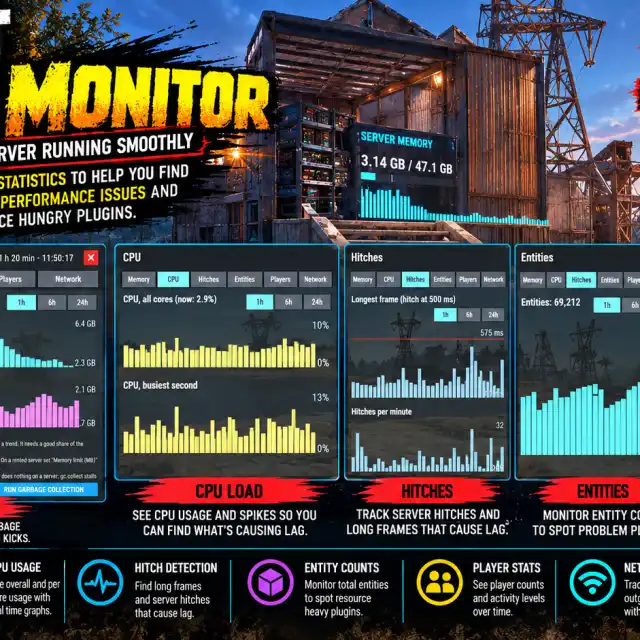
MemoryGauge shows memory against your host's limit, the rate of climb and the time left at that rate, and warns before you get there. The usual fixes are restarting mid-wipe, removing the plugin behind heap growth, or cleaning up the entities that are filling the world.
A routine that catches most problems
- After every wipe and every Rust update, look for new errors in the console.
- Keep an eye on server fps and memory for the first busy evening.
- When players complain, check whose lag it is before changing anything.
- Add plugins one at a time, so a new problem has an obvious cause.
Plugins mentioned

Probe
v0.4.0Tells you whose lag it is (the server's, the network's or one player's) with every player's ping, packet loss and tick delay live in one panel.
- Rating:—
- Servers running it:—
- A SERVER / NETWORK / PLAYERS verdict on whose lag it is
- Every player's ping, packet loss, tick delay and resend buffer live
- Client fps on request, one player or everyone
- Sortable, searchable player list with five-minute sparklines
MemoryGauge
v0.4.2A see-through server memory gauge for admins, with alerts when memory runs high or keeps creeping up.
- Rating:—
- Servers running it:—
- See-through corner gauge with sparkline and time to the limit
- WATCH and ALARM alerts on high or creeping memory
- Hitch alerts that name the busiest plugins
- Panel charts for memory, CPU, hitches, entities, players and network