Overview
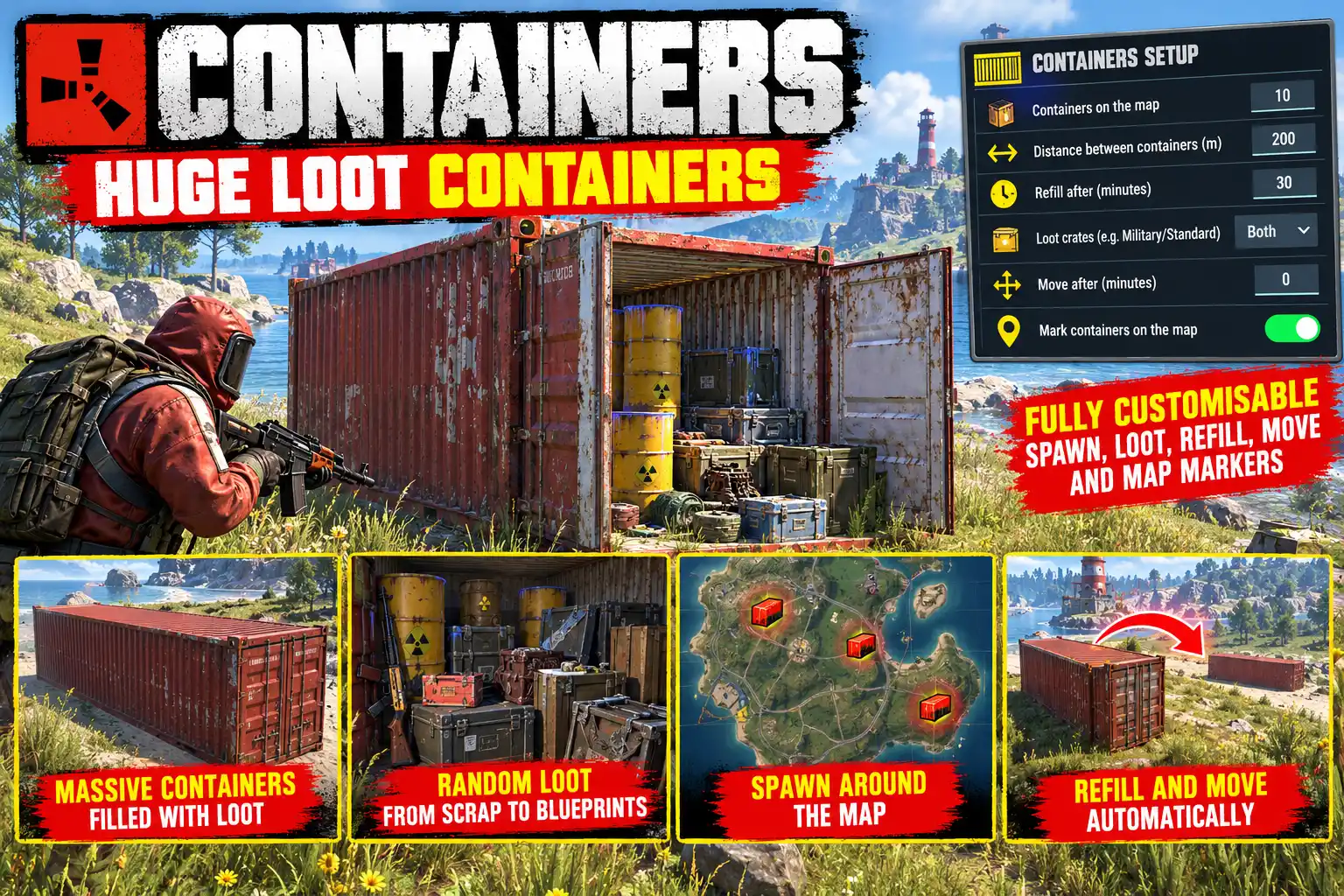
Containers puts shipping containers out about the map with loot inside. Each one is the game's own harbour container: real double doors at both ends that open with E, and one of its three interiors picked at random (radiation barrels, metal crates or office junk).
Inside is a military crate, a standard crate or both, your choice. They fill from the game's own loot tables, so the loot fits your server's balance with nothing to set up.
Somewhere to find loot, not somewhere to live
The containers cannot be locked, built in or picked up, and no tool cupboard covers them. They are places to stop and search on the way across the map, never a free base.
Customise the loot you want players to receive to help them on their Rust journey. It could be complete rubbish, it could be a life saver !
Refilled on a timer
Once a crate in a container is opened or emptied, that container's crates come back full after 30 minutes (config). A refill waits while someone still has a crate open.
When it refills, the doors are shut again, so players can tell at a glance that it may have been reset. A broken door is hung again at the same time.
Moving about
Optionally, each container is taken away after a set number of minutes and a new one goes up somewhere else, so players cannot simply camp the same spots. A container is never taken away while a player is within 15 m of it.
On the map
Switch on map markers and every container is shown on every player's map as a red crosshair. By default a container's marker comes off while its crates wait to be refilled, so the map only ever points at containers worth visiting.
Where they go
On random open ground clear of roads, rails, rivers, lakes, the sea, cliffs, monuments, rocks and trees; away from tool cupboards (80 m) and from each other (200 m); and never on a steep slope. Nothing is kept in the save: after a restart a fresh set goes up in new places.
Settings panel
Admins type /containers for a panel with every setting in one place: the crates picked from a list, switches and number boxes for the rest, applied on SAVE with no reload. REFILL ALL and MOVE ALL act straight away.
Languages
English, Russian, German, French, Spanish, Brazilian Portuguese and Simplified Chinese are built in, with no lang files to install. Each player sees the language their own client is set to.
Every download is licensed to you and watermarked with your details.
Features
- Shipping containers with loot about the map, 10 by default
- Real double doors at both ends, opened with E
- Military crate, standard crate or both inside (config)
- Crates fill from the game's own loot tables
- Looted crates refilled after 30 minutes (config)
- Doors shut again on refill, broken doors hung again
- Optionally moved somewhere new on a timer
- Never moved while a player is close by
- Optional red crosshair map markers, off while waiting to refill
- Cannot be locked, built in or picked up
- Kept clear of roads, monuments, water, slopes and bases
- Settings panel, applied with no reload
- Seven languages built in
Install
- Download Containers.cs from My Plugins.
- Drop it into
oxide/pluginsorcarbon/plugins. - Grant the admin permission:
o.grant group admin containers.adminOn Carbon use c.grant instead of o.grant. Players need no permission to find and loot the containers.
The file name must stay Containers.cs, because Oxide matches it to the class name.
The config is written to oxide/config/Containers.json (or carbon/configs/Containers.json) on first load. Edit it, then reload the plugin (o.reload Containers or c.reload Containers), or change the settings in game with /containers.
Config
{
  "Containers on the map": 10,
  "Crates in each container (military, standard or both)": "military",
  "Minutes before a looted container's crates are refilled (0 = never)": 30.0,
  "Shut the doors when the crates are refilled": true,
  "Minutes before a container moves somewhere new (0 = never)": 0.0,
  "Mark containers on the map": false,
  "Take the marker off while the crates wait to be refilled": true,
  "Least distance between containers (m)": 200.0,
  "Least distance from a tool cupboard (m)": 80.0,
  "Most the ground may rise across a container (m)": 1.0
}
Commands & Permissions
Commands
Chat (admins)
/containers— opens the settings panel/containers status— lists every container, its grid square and its timers/containers refill— refills every container's crates now/containers move— takes every container away and puts up a new set
F1 or server console
containers.setup— opens the settings panelcontainers.status— the same as/containers statuscontainers.refill— the same as/containers refillcontainers.move— the same as/containers move
Permissions
containers.admin— the settings panel and the status, refill and move commands
Players need no permission: anyone can open a container's doors and loot its crates.
Changelog
| Version | Released | Changes |
|---|---|---|
| v0.4.2 latest |
|