Overview
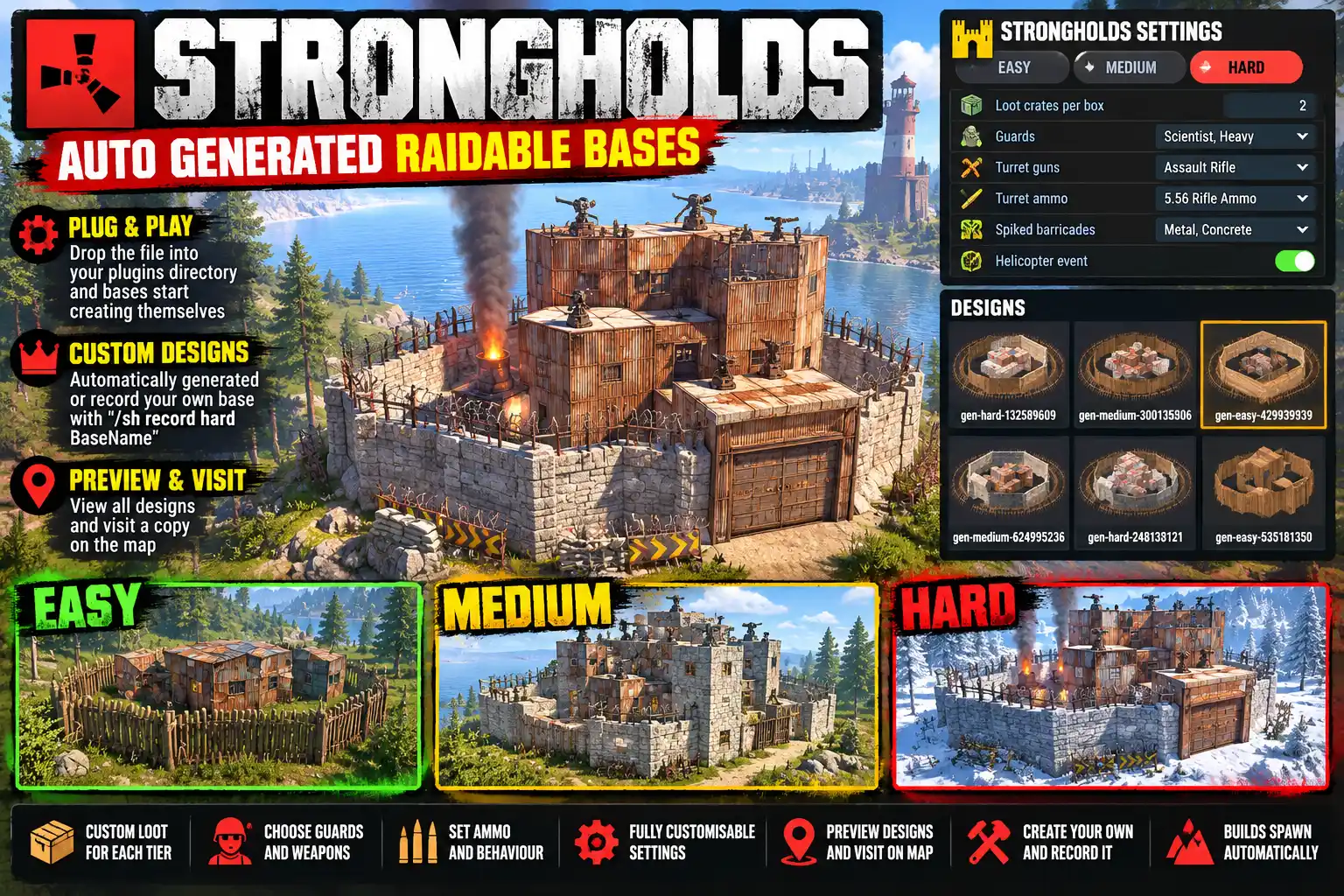
Strongholds puts raidable bases about your map in three tiers, Easy, Medium and Hard. Each one is a real building made of the game's own pieces, standing on the game's own stability, with loot in its boxes, auto turrets, flame turrets and traps armed, and scientist guards posted round it and inside it. Raiding is free: players bring their own explosives.
Bases are found on the map by a circle in the tier's colour with a small castle drawn on it. They are put up on open ground, away from players' bases, players online, safe zones and each other, and taken down again after a time untouched.
Import and Export your designs easily so you can swap them with other server owners.
Where the bases come from
- The Forge, built in, makes new base designs in the background: bases made from a tier and a seed, and variations on the designs it carries (grades, doors, palisades, barricades, windows). A design is kept only if every wall, floor and roof is carried, nothing overlaps, it has a cupboard, at least half its boxes are in one loot room reachable without blowing a wall, and its raid cost in rockets sits in the tier's range.
- Each new design is first put up bare somewhere empty, while the server is quiet, to see that it stands. It then waits in
/sh setupas NEW, with a picture, until you VISIT it and APPROVE it. Nothing goes in front of players until you have approved it. - Your own bases: build one, look at it and type
/sh record <tier> <name>. - Shared designs: EXPORT turns a design into one line of text to copy, and IMPORT takes one pasted in. Imports are checked and tried in game before they can be approved.
Defended by tier
- Loot from the game's own crate tables, plus extra items per tier that you choose by picture, with least, most and chance. The cupboard is stocked with upkeep (24, 48 or 72 hours by default).
- Auto turrets given a gun and a limited supply of ammunition, raised on a barrel where a sill or wall would block their view; flame turrets fuelled, shotgun traps loaded.
- Scientist guards outside and inside (3 and 0 on Easy, 4 and 2 on Medium, 6 and 4 on Hard by default), with their health, damage, aim and chase distance set per tier. A base's own turrets and traps never shoot its guards.
- Barricade rows round the base, a random mix per piece (wood, sandbags, metal, concrete, stone, pillboxes, spikes, landmines), so no two bases look alike.
- A lived-in yard: lit furnaces, a refinery, a BBQ, water catchers, a planter, a chicken coop and more set out on clear ground, and trees and bushes of the kinds already growing nearby. The furnaces smoke on wood that never burns down.
- Glowing Workshop skins on doors, boxes, furnaces and turrets: community skins Facepunch never took into the store, free for anyone (a switch).
Raid rules
- The first player to hit a base locks it to their team. Nobody else can hurt it or loot it (a switch). The lock lapses after 10 minutes with no hit or loot.
- A base is taken once 80% of its loot is gone or its cupboard is destroyed, then comes down a few minutes after the raiders leave.
- Lockouts per tier after a raid, so one team cannot farm every base.
- No building within 10 m of a base (config), and no upgrading, repairing or authorising on it.
For the raiders
/sh shows every stronghold on the map with its grid square, distance, guards and turrets left, and whether it is free to raid, locked or taken, plus your own lockouts and the rules. Once a raid starts the whole team gets a raid panel: loot taken against the share that takes the base, boxes still holding loot, boxes never opened (for loot hidden in walls), the cupboard, turrets, guards, how far off the nearest loot left is, and a raid log. News comes in chat as it happens: Outer wall breached!, Loot room breached!, TC destroyed!
Easy on the server
A base with no player within 300 m goes to sleep: its guards are put away, its turrets switched off and its fires let out, and all come back the moment a player comes near or the base is hit. A new base goes up a few pieces at a time rather than all in one frame.
Set up in game
/sh setup holds every setting, general and per tier, applied on SAVE with no reload. Guns, ammunition, crates and guard kinds are picked from dropdowns with pictures. Each tier has a gallery of its designs as pictures, to approve, preview or delete, and a FORGE tab sets what the Forge makes.
Languages
English, Russian, German, French, Spanish, Brazilian Portuguese and Simplified Chinese are built in, with no lang files to install. Each player sees the language their own client is set to.
Every download is licensed to you and watermarked with your details.
Features
- Raidable bases in Easy, Medium and Hard tiers
- Built-in Forge makes new base designs in the background
- Every design checked and tried in game before you approve it
- Record your own bases; export and import designs as text
- Kept on the map and scheduled per tier, placed on open ground
- Map circles in each tier's colour with a castle drawn on them
- Loot from the game's crate tables plus extras per tier
- Auto turrets, flame turrets, shotgun traps and landmines armed
- Scientist guards outside and inside, never shot by their own turrets
- Random barricade rows, a lit yard, trees and bushes round each base
- Glowing Workshop skins on doors, boxes, furnaces and turrets
- Raid lock to the first team, lockouts per tier, no-build zone
- Raid panel and raid news for the raiding team
- Bases sleep with no player near, to spare the server
- Every setting in an in-game panel, no reload needed
- No buying: free to raid, bring your own explosives
- Seven languages built in
Install
- Download Strongholds.cs from My Plugins.
- Drop it into
oxide/pluginsorcarbon/plugins. - Grant the admin permission:
o.grant group admin strongholds.adminOn Carbon use c.grant instead of o.grant. Players need no permission to see or raid strongholds.
The file name must stay Strongholds.cs, because Oxide matches it to the class name.
- The plugin comes with no designs of its own. The Forge starts making them straight away and tries each one in game while few players are online. Open
/sh setup, look through the NEW designs in each tier (the eye shows a picture, VISIT takes you to a copy) and APPROVE the ones you like. Bases go up once a tier has approved designs. You can also record your own with/sh record.
The config is written to oxide/config/Strongholds.json (or carbon/configs/Strongholds.json) on first load. Most people never need to open it, since /sh setup edits every setting in game. If you do edit it, reload the plugin afterwards (o.reload Strongholds or c.reload Strongholds).
Config
{
  "Sleep: a base with no player within this many metres puts its guards, turrets and fires away (0 = never)": 300.0,
  "Skins: colourful, glowing Workshop skins on doors, boxes, furnaces and turrets": true,
  "Yard: set things out on clear ground round a base": true,
  "Announce new strongholds in chat": true,
  "Placement": {
    "Metres from any player's cupboard": 250.0,
    "Metres between strongholds": 400.0,
    "Metres from any safe zone (Outpost, Bandit Camp, fishing villages)": 100.0
  },
  "Raids": {
    "The first player to hit a base locks it to their team": true,
    "Others cannot hurt or loot a locked base": true,
    "A lock lapses after this many minutes with no hit or loot from the team": 10.0,
    "A base is taken when its cupboard is destroyed": true,
    "No building within this many metres of a base's edge": 10.0,
    "Show the raiding team a raid progress panel": true
  },
  "Tiers": {
    "hard": {
      "Raid: taken once this share of the loot is gone (%)": 80.0,
      "Kept on the map": 3,
      "Map colour": "#F85149",
      "Loot: hours of upkeep stocked in the cupboard (0 none)": 72.0,
      "Loot: extra items, each put in a random box": [
        { "Item": "explosive.timed", "Least": 2, "Most": 4, "Chance (0-1)": 0.6 }
      ],
      "Defences: least auto turrets (added indoors if the design has fewer)": 8,
      "Guards: outside": 6,
      "Guards: inside": 4,
      "Guards: kind outside": "scientistnpc_full_lr300",
      "Guards: kind inside": "scientistnpc_heavy",
      "Guards: metres they chase from their post": 50.0
    }
  }
}
Commands & Permissions
Commands
Raiding
- Type
/shto see the strongholds on the map, their grid squares and whether they are free to raid. - Head there with your team and your explosives. The first hit locks the base to your team.
- Watch the raid panel for loot left and boxes never opened. The base is taken once most of its loot is gone or its cupboard is down.
Chat, everyone
/sh— the strongholds on the map, your lockouts and the rules/sh hud— hides or shows the raid panel
Chat, admins
/sh setup— every setting per tier, designs to approve, the gallery and the Forge/sh record <easy|medium|hard> <name>— records the building you are looking at as a design/sh list— designs and standing strongholds/sh spawn <tier> [name]— puts one up at a spot found for it/sh paste <name>— puts a copy up where you are looking/sh remove— takes down the nearest stronghold/sh export <name>— shows a design as text to copy/sh import— a box to paste a design into/sh back— back from visiting a design, taking the copy down
Console (server console, RCON or an admin)
strongholds.panel— opens or closes/sh(bindable to a key)strongholds.list,strongholds.spawn <tier> [name],strongholds.remove <id|all>strongholds.paste <name> <x> <z> [yaw]— puts a copy up at a chosen spotstrongholds.loot <id> [refill],strongholds.defend <id>,strongholds.guards <id> [again]strongholds.lockouts [clear]— lists or clears raid lockoutsstrongholds.export <name>/strongholds.import <text>— a design as text, and backshforge.status— designs the Forge has waiting, made, passed and failedshforge.make [count]— makes designs nowshforge.gen <tier> [seed]— makes the base for a given seedshforge.trial— tries the next waiting design now
Permissions
strongholds.admin—/sh setup, recording, spawning, pasting, removing and approving designs, and the admin buttons in/sh
Players need no permission: /sh, the raid panel and raiding itself are for everyone.
Changelog
| Version | Released | Changes |
|---|---|---|
| v0.4.8 latest |
|