Overview
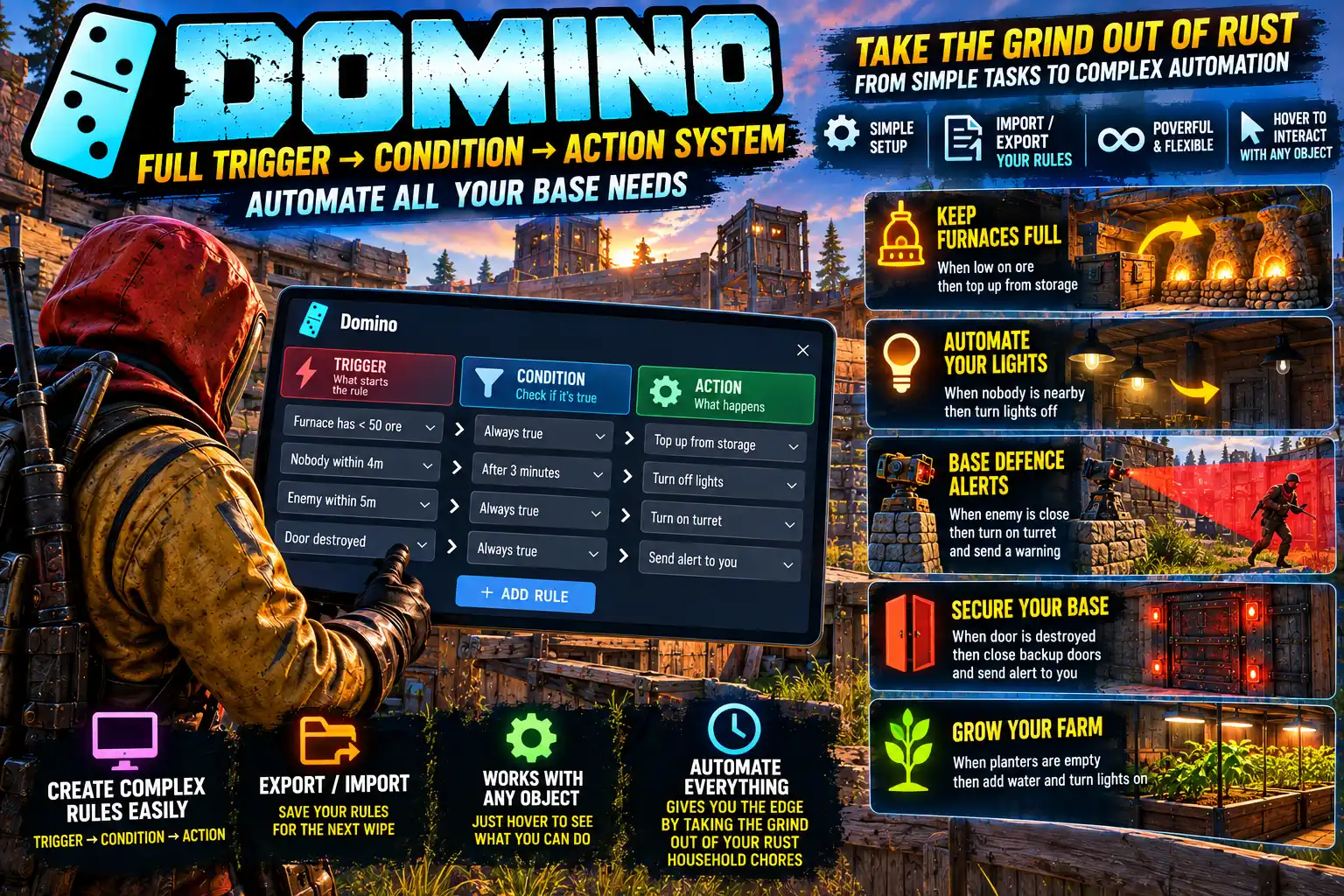
Domino is "if this, then that" for a Rust base. Players make simple rules, and from then on the base does its own chores: furnaces fed and emptied, turrets kept loaded, the cupboard kept stocked, tools and weapons crafted as stock runs low, walls and vehicles repaired, lights, doors and traps worked by who is near, and an alert on your phone when the raid starts.
A rule reads the way you would say it:
- WHEN the furnace holds less than 100 wood, THEN top it up from the wood box.
- WHEN the guns box holds fewer than 2 assault rifles, THEN craft one.
- WHEN a stranger comes within 10 metres of the gate, THEN switch the turrets' power on.
There is nothing to type. /domino opens a panel, and to point a rule at something you look at it and click. Rules carry on working while their owner is offline.
Nothing is free. A craft uses the game's own ingredients, workbench and craft time; a repair uses the game's own repair materials; items are only ever moved between your own containers. Domino does the walking, not the farming.
The time it saves
These are the jobs a base asks for every time you log on. Each one is a rule, or one press of a shortcut.
- Smelting. No more carrying wood and ore to each furnace, coming back when it is done and carrying the metal away. Furnaces are fed from your boxes, lit when there is ore, switched off when it runs out (so no wood is burned for nothing), and emptied into the boxes that already hold what they make.
- Upkeep. The cupboard is kept stocked with as many hours of upkeep as you say, from a box, as it runs down. No base lost to decay because nobody topped it up.
- Ammunition. Auto turrets are topped up from an ammo box as they fire, so they do not run dry halfway through a raid. You normally have to kill the power to do this so connect them to a switch so when the ammo is low turn off the turret, fill it with ammo and switch it back on - done!
- Crafting. Keep so many of anything in a box: guns, ammunition, meds, tools, low grade fuel, gunpowder. When the stock drops, more is made from the parts in your boxes. Whether its crafting fuel, ammo or guns - just keep grabbing what you need and it replenishes itself (well... if you have the raw materials)...
- Repairs. A wall, a door or a minicopter all mended from a box of materials whenever its damaged or decays.
- Farming. Ripe plants are picked and put away in your boxes, and a rule can tell you when a planter's water runs low.
- Power. A biofuel generator is stirred when it needs it. A rule can act when a battery's charge drops below a level, or when something loses power.
- Sorting. Whatever lands in one container is moved on to another: a drop box by the door emptied into the store room.
Shortcuts: a whole rule in one go
Under the list of rules are six buttons that make a finished rule for you. Look at the things in turn and say how much.
- SET UP FURNACES: stand in your base and press it. Every furnace under that cupboard gets its rules: fed 100 wood and 50 each of metal, sulfur and HQM ore from your boxes, switched off with no ore, lit again with ore, and emptied into the boxes that already hold its products.
- KEEP A CUPBOARD STOCKED: so many hours of upkeep, taken from a box.
- KEEP SOMETHING TOPPED UP: a furnace's wood, a turret's ammunition, a cupboard's stone.
- EMPTY SOMETHING INTO A BOX: a furnace's metal, moved out as it is made.
- KEEP SOMETHING REPAIRED: a vehicle, wall or door, mended from a box whenever it is damaged.
- KEEP SOMETHING CRAFTED: so many of an item kept in a box, made as they run low.
How a rule is made
- Type
/dominoand press NEW RULE. - Choose the WHEN. Press LOOK, look at the thing and left click (or press R). It is shown inside a red sphere, so you can be sure what you picked, and the panel lists what a rule can do with it.
- Add any IF conditions. With two or more, the rule asks for ALL of them or ANY one.
- Add the THEN actions, each straight away or after a delay.
- Switch the rule ON.
EDIT on a line changes its amount, item or container without starting again, and the arrows on the THEN lines put them in the order they should run. RUN NOW fires a rule on the spot and says what happened. Each rule shows when it last fired, or when it was held back and why, so a rule that is not doing what you expected tells you the reason.
WHEN: what can set a rule off
- Something happens to a thing: it is destroyed, looted, knocked on, has a wrong code entered, or (a trap) is set off. Someone authorises on a cupboard.
- Something changes: it turns on or off, a door opens or closes, a lock is locked or unlocked, something gets power or loses it.
- A container comes to hold less or more than an amount of an item. Several items can be counted at once: a furnace out of every ore.
- A level runs down: a battery's charge or a planter's water crosses a percentage, anything's health drops below one (a wall decaying, or being raided), a cupboard has less than so many hours of upkeep.
- Someone is near: anyone, a friend, a stranger, or a wild animal or NPC comes within so many metres of something, or nobody is that near any more. No sensor and no power are needed. A friend is you, your team, and anyone authorised on the cupboard.
- Sensors and turrets: an auto turret picks out a target or loses it, an HBHF sensor detects someone, a seismic sensor feels an explosion.
- Farming and fuel: a plant in a planter is ripe, a biofuel generator needs stirring.
- The clock: night or day begins, or EVERY so many seconds, minutes, hours or days. The count carries on through a restart.
- You: you log on or log off, or you fire the rule by hand, from the panel or from a key.
A WHILE rule fires again every so often for as long as something stays so, which is what a top-up or a repair wants.
IF: what a rule can check first
Whether something is on or off, a door open or closed, a lock locked. How much of an item a container holds. A battery's charge, a planter's water, anything's health. Night or day. Whether whoever set the rule off is authorised on the cupboard, or is a stranger. Whether something has power, a turret has a target, a sensor detects someone, a plant is ripe. Whether you are online. Whether anyone, a friend, a stranger or an animal is near.
So the same raid alarm can stay quiet while you are at home, and the lights can come on only at night.
THEN: what a rule can do
- Turn things on, off or over: switches and smart switches, furnaces and other ovens, recyclers, conveyors, generators, mixing tables.
- Open or close a door. Lock or unlock a code lock or key lock.
- Move items from one container into another, or top one up to an amount.
- Stock a cupboard with so many hours of upkeep.
- Repair something up to a percentage of its health.
- Craft an item into a container.
- Harvest a planter into your boxes.
- Stir a biofuel generator. Press a push button.
- Set an auto turret to peacekeeper or to attack all. Turn a SAM site off or on.
- Unset a bear trap or landmine so it harms nobody, and reset it.
- Send a message to you, or to you and every team member online.
- Send an alert to your phone through Rust+, as a Smart Alarm does.
Items go where the game would put them: wood in a furnace's fuel slots, ore in its input slots. What the receiving container has no room for stays where it was.
Rules set off other rules
That is where the name comes from. One rule's action can be another rule's WHEN, so short rules strung together make a longer process: the ore box runs out, the furnace is switched off, the furnace switching off sends you a message. Each rule stays simple enough to read at a glance.
Base safety
- A raid alarm with no wiring out of it. WHEN a seismic sensor feels an explosion, or a wall's health drops, or a door is destroyed: alert your phone and message the team.
- A warning before the raid. WHEN a wrong code is entered on the door, or someone authorises on your cupboard, you are told.
- Turrets that wake for strangers. Their switch goes on WHEN a stranger or an animal comes within 10 metres, and off again WHEN none is that near. Peacekeeper while you are online, attack all when you log off.
- Traps that know you. Bear traps and landmines unset when a friend comes near and set again when they have gone.
- Lockdown on one key. A rule fired by hand can close every door, lock the locks and set the turrets to attack all. Bind it:
bind k domino.run lockdown. - Lights that follow you. Their switch goes on when you come within 5 metres and off when nobody is near, and only for you and yours if you like.
- A SAM site switched off from a key before a friend flies in, and on again afterwards.
Crafting
Crafting is the game's own, done for you. Pick the container the finished item goes into, and what to make. The blueprint's ingredients are taken from that container and from every box under the same cupboard, nearest first, so nothing has to be gathered into one box beforehand.
- It needs a workbench of the level the item needs, within a few metres of any of those boxes. A better bench crafts faster, as it does for a player.
- It takes the game's craft time.
- Only items whose blueprint the rule's owner has learned can be made (a setting).
- The parts are taken when the item is finished, so nothing is lost if the server stops halfway. With no room for the item, nothing is made.
- A cupboard's upkeep, a furnace's ore and a locker's kit are never used as parts.
- A base crafts one thing at a time.
Sharing rules, and wipe day
The arrow on a rule shows it as one line of text to copy and give to anyone. IMPORT makes a rule from a pasted text, switched off. The text says what a rule does, not where anything is, so each line that needs one of your things is shown in red, and REPLACE points it at yours.
EXPORT ALL shows every rule you have that way. Copy the lot into a text file before a wipe and paste it into IMPORT afterwards to get every rule back at once, ready to be pointed at the new base. On a new map the old rules are cleared automatically.
REPLACE also mends a rule after a raid: when a door a rule used has been destroyed and rebuilt, look at the new one and the rule takes it everywhere it named the old one.
Fair on a live server
- Your own base only. A rule acts only on things under a cupboard its owner is authorised on, or, with no cupboard, on things its owner placed. That is checked every time the rule fires, not only when it is made.
- Locks are respected. A rule opens a locked door, or takes from a locked box, only if its owner is on the lock. Being on the cupboard is not enough, so a raider who authorises cannot write a rule that opens your doors.
- The game's own costs. Crafts, repairs and upkeep use the same materials a player would.
- Power still matters. Electrical things are worked through a switch the player has wired in, so they still need power. A setting, off by default, lets rules switch unwired turrets and lights on directly.
- Monuments are left alone. Monument SAM sites and safe zone turrets cannot be picked.
Light on the server
- A limit on rules per player (10 by default) and actions per rule (4).
- Every rule has a cooldown, a chain of rules stops after a set number of links (8), and each player's rules may fire only so many times a minute (60), so a rule that sets itself off cannot run away.
- It does not hook item movement at all, the busiest event in the game. Containers are checked once a second instead.
- Hooks are switched on only while a rule needs them.
Every kind of WHEN, IF and THEN is run by an automated test of 90 checks on both Carbon and Oxide before a release.
Every setting, in game
SETTINGS, in the panel for players with domino.admin, lists every setting. Change the values and press SAVE: they apply at once, with no reload.
- Most rules one player may have: default 10.
domino.adminhas no limit. - Most actions one rule may have: default 4.
- Longest delay before an action: default 300 seconds.
- Shortest time before a rule may fire again: default 1 second.
- Most rules one event may set off in a chain: default 8.
- Most times one player's rules may fire in a minute: default 60.
- How often a WHILE rule fires again: default 10 seconds.
- Shortest time an EVERY rule may be set to: default 10 seconds.
- Farthest apart two containers may be to move items between them: default 40 metres. 0 allows any distance.
- Rules may craft items: default on.
- Crafting needs the blueprint learned: default on.
- Farthest a workbench may be from a box a craft can use: default 6 metres.
- Rules may switch turrets and lights on with no power: default off.
- Farthest a rule may look for someone near something: default 10 metres. 0 switches it off.
- Log every rule that fires to the server console: default off.
Languages
English, Russian, German, French, Spanish, Brazilian Portuguese and Simplified Chinese are built in, with no lang files to install. Each player sees the panel and its messages in the language their own game is set to. The names of things and items are the game's English ones.
Good to know
- A phone alert needs Rust+ running on the server, and reaches the rule's owner and their team, whoever has paired the server in the Rust+ app. One rule sends at most one alert every 15 seconds.
- A seismic sensor and an HBHF sensor need power to detect anything, as they do in the game.
- A repair is refused for 30 seconds after the thing was damaged, as the hammer's is; the rule tries again when that is up.
- Items that need a Steam item or DLC to craft cannot be made by a rule.
Every download is licensed to you and watermarked with your details.
Features
- If this, then that for a base: WHEN something happens, IF conditions hold, THEN act
- Furnaces fed, lit, switched off and emptied by themselves, set up in one press
- Auto turrets kept loaded and cupboards kept stocked with upkeep
- Auto-crafting: keep so many of any item in a box, made from the parts in your boxes
- Walls, doors and vehicles repaired from a box of materials
- Planters harvested into your boxes; biofuel generators stirred
- Raid alarms: a phone alert through Rust+ and a team message
- Rules by who is near: anyone, friends, strangers, or animals and NPCs
- Doors, locks, turret modes, traps and SAM sites worked by rules
- Rules chain: one rule's action sets off the next
- Timers: every so many seconds, minutes, hours or days, kept through a restart
- Point at things by looking at them; nothing to type
- Six shortcuts that make a whole rule in one go
- Rules shared as text; export them all before a wipe and import them after
- The game's own costs for crafts and repairs; your own base and your own locks only
- Limits on rules, chains and fires a minute, all set in game with no reload
- Works while the owner is offline
- Seven languages built in
Install
- Download Domino.cs from My Plugins.
- Drop it into
oxide/pluginsorcarbon/plugins. - Grant the permissions:
o.grant group default domino.use
o.grant group admin domino.admin
On Carbon use c.grant instead of o.grant.
The file name must stay Domino.cs, because Oxide matches it to the class name.
Nothing else is needed. The panel's icons are inside the file, so there is no image plugin to install.
The config is written to oxide/config/Domino.json (or carbon/configs/Domino.json) on first load. Change it in game with SETTINGS in the panel, or edit the file and reload the plugin (o.reload Domino or c.reload Domino).
Phone alerts need Rust+ running on the server. Everything else works without it.
Config
{
  "Most rules one player may have (domino.admin has no limit)": 10,
  "Most actions one rule may have": 4,
  "Longest delay before an action (seconds)": 300.0,
  "Shortest time before a rule may fire again (seconds)": 1.0,
  "Most rules one event may set off in a chain, one after another": 8,
  "Most times one player's rules may fire in a minute": 60,
  "A 'while' rule fires again this often for as long as it stays so (seconds)": 10.0,
  "Shortest time an 'every' rule may be set to (seconds)": 10,
  "Farthest apart two containers may be for a rule to move items between them (metres, 0 = any distance)": 40.0,
  "Rules may craft items from the parts in a base's boxes": true,
  "Crafting needs the rule's owner to have learned the item's blueprint": true,
  "Farthest a workbench may be from the nearest box a craft can use (metres)": 6.0,
  "Rules may switch auto turrets and lights on with no power, when nothing is wired into them": false,
  "Farthest a rule may look for a player near something (metres, 0 = rules cannot look for players)": 10,
  "Log every rule that fires, and every one held back, to the server console": false
}
Commands & Permissions
Commands
Chat
/domino— open the panel: your rules, the editor and the shortcuts
Console, for players (all bindable)
domino.open,domino.close— open and close the paneldomino.run <rule number or name>— fire one of your own rules by hand:bind k domino.run lockdown
While picking something
- Left click or R — pick what you are looking at
- Right click — back to the panel
Admin console (server console, RCON or domino.admin)
domino.list [ownerId]— every rule, or one player'sdomino.stats— how many rules, how often they fire, which hooks are ondomino.kinds— every kind of WHEN, IF and THENdomino.enable <rule> <0|1>,domino.del <rule>,domino.fire <rule>— switch, delete or fire any ruledomino.export <rule>,domino.exportall [ownerId],domino.import <ownerId> <text>— rules as textdomino.find,domino.add,domino.if,domino.then,domino.move,domino.match,domino.order,domino.cooldown,domino.name,domino.items,domino.parts— make and edit rules without the panel; the header of the file lists what each one takes
Permissions
domino.use— make rules in your own basedomino.admin— rules on anything, with no rule limit and no ownership or lock checks; SETTINGS in the panel; the admin console commands. It includesdomino.use. For admins only
Changelog
| Version | Released | Changes |
|---|---|---|
| v0.22.1 latest |
|