Overview
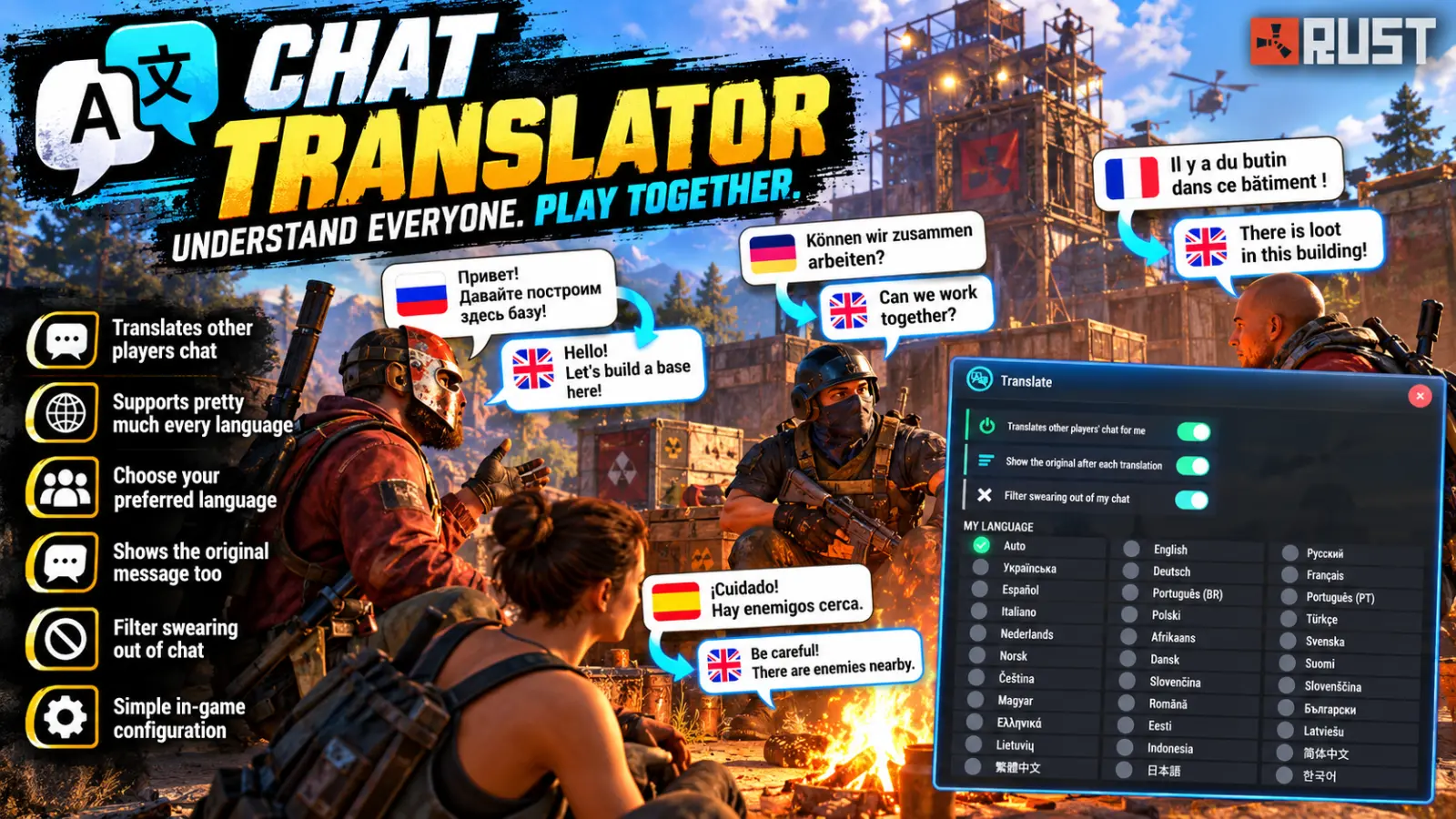
A Russian player types in global chat, and your English players read it in English, your Germans in German and your Brazilians in Portuguese. The Russian players still see it exactly as it was typed. Translate turns a server full of languages into one conversation.
How it works
Each player's language is taken from their game's language setting, so most players never touch a thing. Anyone can pick their own by hand in /translate, from 32 languages, each written the way its own speakers write it (Русский, Deutsch, 简体中文, 日本語…). When someone chats, every reader gets the line in their own language, with the original after it in small grey text. Each player can hide the original, or switch translation off for themselves.
Global and team chat are translated. Local, clan and card-table chat are left alone. Messages always arrive in the order they were typed, and if the translation service is slow or down, the original is delivered after a few seconds instead. No message is ever lost.
Free out of the box
It uses MyMemory by default: free, with no key and no sign-up, so chat is translated the moment the plugin loads. That gives 5,000 characters a day, or 50,000 if you add a contact email. When you want more, switch service in the panel:
- DeepL gives the best translations. DeepL API Free allows 500,000 characters a month, and you can choose a casual or formal tone.
- LibreTranslate is open source. Use the public server with a paid key, or run your own server for free with no limit.
The key is pasted into the admin panel and saved straight away, and only its last four characters are ever shown again.
Built to keep costs down
- Nothing is sent that doesn't need to be. English between English players, or Russian between Russian players, never goes to the service at all.
- Every translation is saved (20,000 by default) and survives restarts and wipes. Any line that comes round again, like "gg" or "wanna team?", is answered instantly without asking the service again by pulling it instantly from cache.
- A monthly character cap can be set. When it is reached, chat carries on untranslated until the 1st. When MyMemory's daily allowance runs out, the plugin pauses for an hour and tells your admins once, instead of sending every line to be refused.
Swearing filter
Each player can star swearing out of the chat they see (f***), and the server can make that the default or force it on for everyone. Built-in lists cover English, Russian, German, French, Spanish, Portuguese and Chinese. The filter catches the usual disguises (fuuuck, sh1t, f.u.c.k, cyka) and leaves innocent words such as Scunthorpe, class and assassin alone. Add your own words, or allow ones it gets wrong, in the config. It works on all global and team chat whether or not it is translated. It never uses the service, and the server log keeps the original.
The panel
/translate gives every player their switches and a language grid. Admins also get the server column, where they can:
- choose the service and paste its key or address
- set DeepL's tone
- see this month's usage, how many saved translations have been reused, and the last error
- run a TEST translation and CLEAR SAVED translations
Parrot mode sends an admin's own chat back to them translated, and translate.say posts global chat from a pretend player over RCON. Between them you can check everything on your own before any players arrive.
Arabic and Hebrew are not offered, because Rust's chat cannot draw right-to-left text. The plugin's own text comes in seven bundled languages: English, Russian, German, French, Spanish, Brazilian Portuguese and Simplified Chinese.
Every download is licensed to you and watermarked with your details.
Features
- Translates global and team chat into each player's own language
- The original is shown after it in small grey text
- Language taken from the game, or chosen from 32
- Free out of the box with MyMemory, with no key needed
- DeepL (casual or formal tone) and LibreTranslate supported
- Every translation saved and reused, so repeats cost nothing
- Messages stay in order and are never lost if the service is down
- Swearing filter in seven languages, per player or server-wide
- Admin panel with usage, a test button and parrot mode
- Seven bundled languages for the plugin, 32 languages translated in chat
Install
- Download Translate.cs from My Plugins.
- Drop it into
oxide/pluginsorcarbon/plugins. - Grant the permissions:
o.grant group default translate.use
o.grant group admin translate.admin
The file name must stay Translate.cs, because Oxide matches it to the class name.
That's all it needs: chat is translated through MyMemory straight away. To add a contact email, or to switch to DeepL or LibreTranslate, open /translate as an admin and paste it into the server column. Each service's account is between you and that service.
Keeping a key private: a key typed into the panel reaches the server as a console command, and the game passes that to Facepunch's analytics when a server has them switched on. To keep a key entirely private, put it in config/Translate.json instead and reload the plugin.
Other chat plugins: a plugin that also rewrites chat lines (a chat formatter using OnPlayerChat) can't run alongside Translate, because both try to replace the same message.
Config
{
  "Web address shown in the panel's About dialog (empty hides the footer)": "https://deadinten.uk",
  "Translation service (MyMemory, DeepL or LibreTranslate)": "MyMemory",
  "MyMemory: contact email, raises the free limit from 5,000 to 50,000 characters a day (optional)": "",
  "DeepL key, from deepl.com/pro-api (a free key ends in :fx)": "",
  "DeepL: English for English readers (EN-GB or EN-US)": "EN-GB",
  "DeepL: tone of a translation (casual, formal or default)": "casual",
  "LibreTranslate address": "https://libretranslate.com",
  "LibreTranslate key, from portal.libretranslate.com (empty if your own server needs none)": "",
  "Translate global chat": true,
  "Translate team chat": true,
  "Translation is on for a player who has not chosen": true,
  "The original is shown for a player who has not chosen": true,
  "Seconds to wait for a translation before sending the original": 3.0,
  "Most characters sent for translation in a month (0 = no limit)": 0,
  "Most saved translations kept (the least recently used go first)": 20000,
  "Colour of the original after a translation": "#9aa0a8",
  "Text size of the original after a translation": 11,
  "Swearing is filtered for a player who has not chosen": false,
  "Swearing is filtered for everyone, whatever they choose": false,
  "A filtered word keeps its first letter (f***), else it is all stars (****)": true,
  "Filter the built-in swear words": true,
  "More words to filter (word = that word, word* = starting with it, *word* = holding it)": [],
  "Words never filtered, even when a filtered word matches them": []
}
Commands & Permissions
Commands
Chat
/translate— open the settings panel/translate on|off— translation for you/translate original— show or hide the original/translate lang <code|auto>— your language (en, ru, de, pt-BR…), orautoto follow your game/translate filter— star out swearing in the chat you see/translate test [text]— admins: translate a line and show the result/translate parrot— admins: your own chat comes back to you translated
Console / RCON
translate.test [code] [text]— try the service from the server consoletranslate.say <text>— global chat from a pretend player, translated for everyonetranslate.filtertest <text>— show a line as the swearing filter leaves it
Permissions
translate.use— chat is translated for you, and the settings paneltranslate.admin— the server settings in the panel, and the admin commands
The swearing filter's server-wide settings apply to every player, with or without a permission.
Changelog
| Version | Released | Changes |
|---|---|---|
| v0.5.0 latest | First release on this store. |