Overview
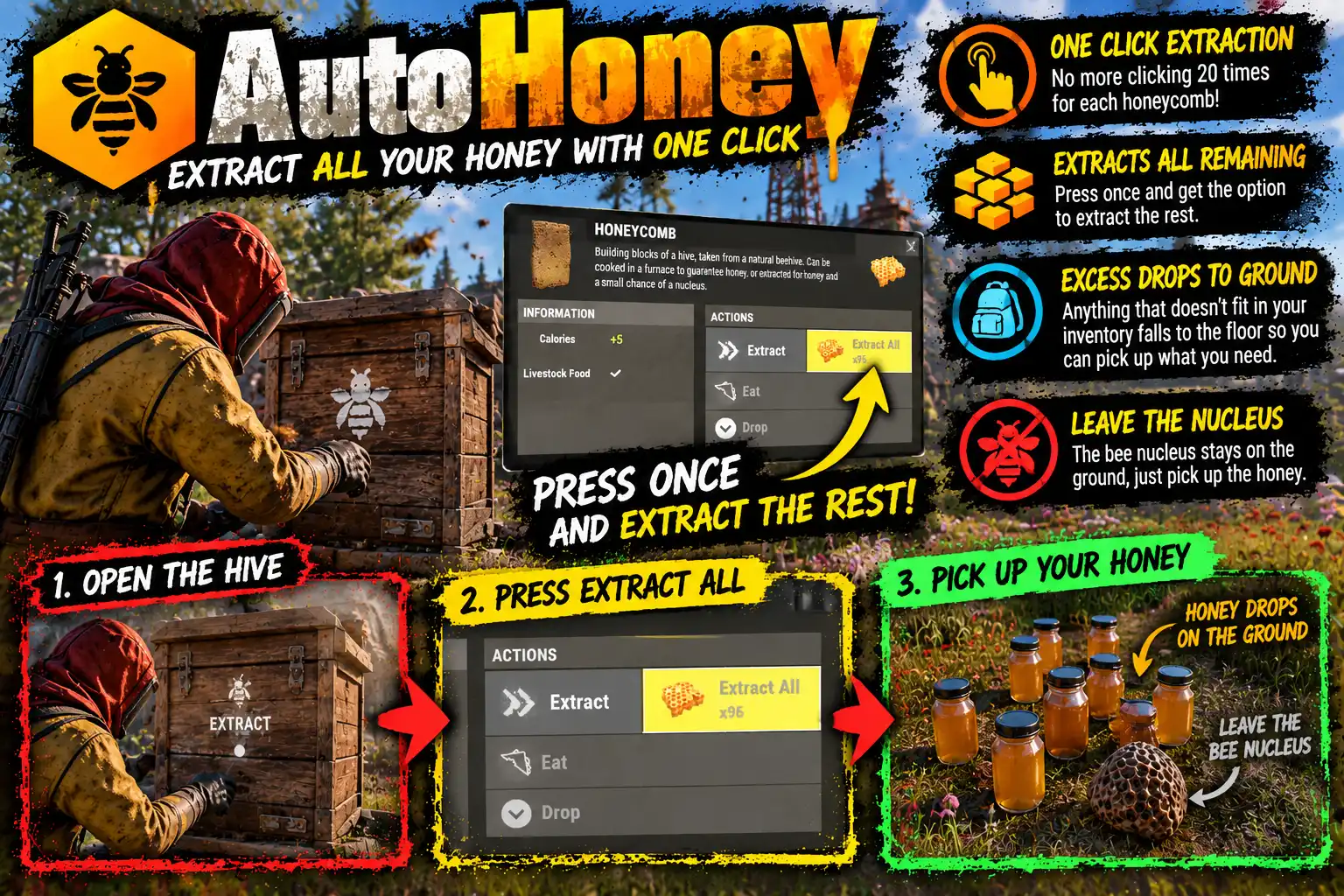
AutoHoney adds an Extract All button beside the game's own Extract on a honeycomb, so a whole stack is turned into honey in one click instead of twenty.
Anyone who keeps bees knows the routine. You empty the hives, open your inventory, select a stack of honeycomb and press Extract. One comb. Extract. One comb. Extract. Twenty clicks a stack, several stacks a harvest, and somewhere in the middle a bee nucleus takes your last free slot and the whole thing stops until you make room.
AutoHoney does the whole stack for you.
One click, one stack
- Extract All sits right beside Extract. Press Extract once on a stack and the button appears on the right half of the game's own Extract button, showing how many combs are in the stack.
- The whole stack in one click. Every comb in that stack is extracted at once.
- Only the stack you chose. Your other honeycomb stacks are left alone, so you can keep some to feed your chickens or cook in a furnace.
- Extract still works as before. The game's own button still takes one comb at a time for anyone who wants that.
Nothing is lost
- Into your inventory first. Honey and nuclei go into your inventory and toolbelt as they would by hand.
- The rest at your feet. Once your inventory is full, whatever is left falls to the ground beside you, and chat tells you exactly what fell. A nucleus filling your last slot no longer stops the job halfway.
- Exactly the game's odds. Each comb goes through the game's own extract, so the honey, the chance of a bee nucleus and the harvesting tea bonus are the same as clicking one at a time.
- One notice, not twenty. You hear the extract once and get one pickup notice for each kind of item, not one per comb.
How the button behaves
The game never tells the server which item you have selected in your inventory, so the button appears once you have pressed Extract on a stack and belongs to that stack. It disappears when the stack is used up, when you use another item, or a few seconds after your last Extract (4 by default). It is drawn on the inventory screen, so it is only ever seen while your inventory is open.
For server owners
- One permission,
autohoney.use. Players without it see the game exactly as normal. - No commands, no data file, nothing to set up beyond the permission.
- Configurable: the items it works on (honeycomb by default; any item with an Extract-style action can be added by its short name), the most extracted in one click, how long the button stays, and its position and colour.
Languages
English, Russian, German, French, Spanish, Brazilian Portuguese and Simplified Chinese are built in, with no lang files to install. Each player sees the button in the language their game is set to. Item names in the dropped-items message are in English, the only language the server has them in.
Every download is licensed to you and watermarked with your details.
Features
- Extract All button beside the game's own Extract on a honeycomb
- Extracts a whole stack in one click instead of one comb at a time
- Only the selected stack; other honeycomb is kept for chickens or cooking
- Output goes into your inventory first, the rest drops at your feet
- Chat lists anything that fell, so nothing goes missing
- Uses the game's own extract: same honey, nucleus chance and tea bonus
- One sound and one notice per item, not one per comb
- Shown only on the inventory screen, gone a few seconds after use
- One permission, no commands, no data file
- Items, button time, position and colour configurable
- Seven languages built in
Install
- Download AutoHoney.cs from My Plugins.
- Drop it into
oxide/pluginsorcarbon/plugins. - Grant the permission:
o.grant group default autohoney.useOn Carbon use c.grant instead of o.grant.
The file name must stay AutoHoney.cs, because Oxide matches it to the class name.
The config is written to oxide/config/AutoHoney.json (or carbon/configs/AutoHoney.json) on first load. Edit it and reload the plugin (o.reload AutoHoney or c.reload AutoHoney).
Config
{
  "Items with an Extract All button (short names)": [
    "honeycomb"
  ],
  "Most extracted in one click": 1000,
  "Seconds the button stays after the last Extract": 4.0,
  "Button left, bottom, right, top (screen units from the bottom middle)": [
    106.0,
    489.0,
    181.0,
    523.0
  ],
  "Button colour (red green blue alpha, 0-1)": "0.80 0.55 0.12 0.92"
}
Commands & Permissions
Commands
There's just one command /honey to setup how you'd like to deal with the results of your sticky adventure. Select a stack of honeycomb in your inventory, press Extract once, then press Extract All beside it. If you chose to drop items they'll be at your feet.
Permissions
autohoney.use— see the Extract All button. Without it the player extracts one comb at a time as normal.
Changelog
| Version | Released | Changes |
|---|---|---|
| v0.2.5 latest |
|