Overview
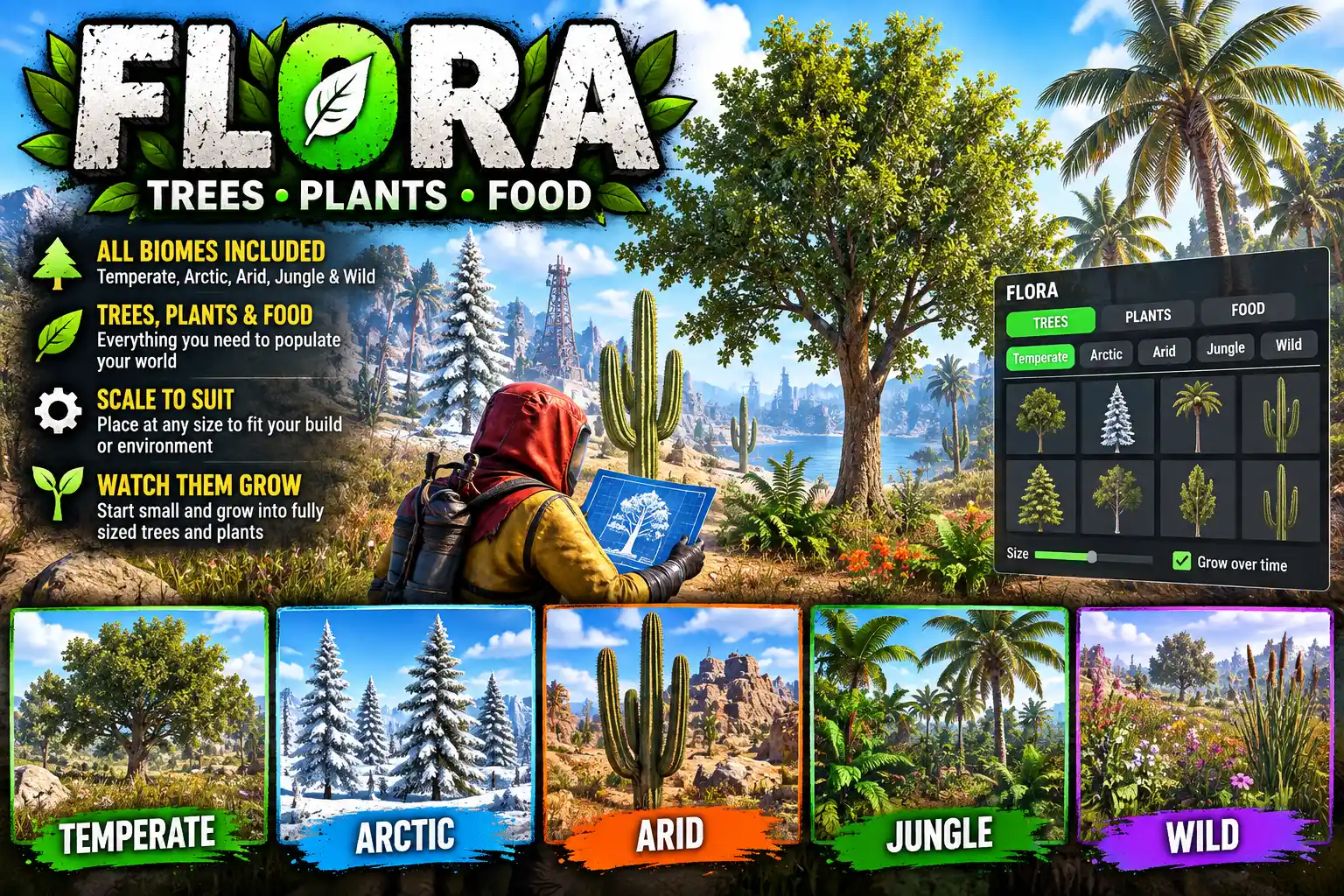
Flora lets players plant round their base. Trees, bushes, cacti, wild plants and crops are picked from a bar above the toolbelt and put in the ground wherever the player looks. Trees and bushes go in small and grow to full size over a couple of hours.
Everything it plants is the game's own, so it looks and behaves like the rest of the map. A planted tree can be chopped for wood, a wild plant can be picked, and a crop is watered and harvested as usual.
The list is read from the game each time the server starts, so it is never out of date. On the current game that is 114 trees, 55 bushes and cacti, 17 wild plants and 14 crops: about 200 things to plant, each with its own picture.
How it works
- Type
/flora. A bar opens above the toolbelt with three tabs: TREES, PLANTS and FOOD. Trees and plants are sorted by biome (Temperate, Arctic, Tundra, Arid and Jungle), and the tiles scroll sideways. - Click a tile. The tree or plant stands in front of you, turning slowly, so you can see what you are getting. LOOK (or a right click) lets go of the mouse so you can look up at a tall tree or down at a crop. Right click again to bring the bar back.
- Set START SIZE, from 10% to 100%. This is how big a tree or bush is when it goes in. Whatever you pick, it still grows to full size.
- Press PLANT. The plant follows where you look. R turns it, a left click puts it in the ground, and you can keep clicking to plant as many as you like. A right click goes back to the bar.
While you are placing, a strip on screen is green when the spot is good and red when it is not, and says why: "It has to go in the ground, not on a building or a rock."
Open /flora again later and it comes back on the tab, biome and plant you last used, ready to plant more.
Trees that grow
- About two hours to full size, in real time. Time with the player offline or the server down counts too. The time is in the config.
- No sudden jumps. The game shows a change of size at once, with nothing in between, so by default a tree takes each growth step only while no player can see it. Turn round and it is a little taller.
- Wood in proportion. A tree at a quarter of its size gives about a quarter of the wood, and gains more as it grows. When the wood runs out it falls like any other tree.
- Beehives stay on their branch. If the game hangs a wild beehive on a planted tree, Flora moves it up with the branch as the tree grows.
Food and wild plants
The FOOD tab plants the game's own crops straight into the ground, with no planter box. They need water and light, they grow through the usual stages, and they are harvested in the usual way. Wild plants, such as berry bushes and mushrooms, go in fully grown and are picked like the ones found on the map.
Fair on a live server
- Your own cupboard only. Planting needs building privilege at the spot, so nobody can plant a forest round someone else's base.
- Natural ground only. Not on foundations, not on rocks, not in water and not on steep slopes.
- Room is kept clear round walls, deployables, other trees, players and vehicles, so a tree cannot be planted through a base or grow into one.
- A limit per player: 30 trees, 40 bushes and wild plants, and 40 crops by default.
flora.adminskips the cupboard check and the limits, for landscaping a town or an event area.
Every one of these is a config setting.
Taking plants up again
REMOVE takes up something you planted. Look at it and left click: it is shown inside a red sphere so you can be sure which one you have picked. Left click again within five seconds and it is gone. Only what Flora planted can be removed, never the map's own trees and plants. Players remove their own, and flora.admin can remove anyone's.
Restarts and wipes
Planted trees and plants are saved with the map and keep their size and their wood through a restart. On a new map the records are cleared automatically, so there is nothing to tidy up on wipe day.
For admins
The config has a Hidden list: any tree or plant whose game path holds one of its words is left off the menu. Use it to take things away from players, or remove a word to put something back. By default it leaves out the vine-swinging jungle trees, stone and ore pickups, diesel barrels and coconuts.
Languages
English, Russian, German, French, Spanish, Brazilian Portuguese and Simplified Chinese are built in, with no lang files to install. The plant names are translated as well. Each player sees the language their own client is set to.
Every download is licensed to you and watermarked with your details.
Features
- Plant trees, bushes, cacti, wild plants and crops round your base
- About 200 to choose from, read from the game itself, each with its own picture
- Sorted by biome: Temperate, Arctic, Tundra, Arid and Jungle
- See it standing in front of you before you plant it
- Trees and bushes start small and grow to full size, offline time included
- START SIZE slider, from 10% to 100%
- Growth steps are taken while nobody is looking, so trees never jump in size
- Real trees: chop them for wood, in proportion to their size
- Real crops, planted in the ground with no planter box
- Only under your own cupboard, on natural ground, with room kept clear
- A limit per player for trees, plants and crops
- REMOVE takes up what you planted, never the map's own trees
- Survives restarts; clears itself on a new map
- All settings accessible from UI so no messing with config files
- Seven languages built in, plant names included
Install
- Download Flora.cs from My Plugins.
- Drop it into
oxide/pluginsorcarbon/plugins. - Grant the permissions:
o.grant group default flora.use
o.grant group admin flora.admin
On Carbon use c.grant instead of o.grant.
The file name must stay Flora.cs, because Oxide matches it to the class name.
Nothing else is needed. The pictures on the tiles are inside the file, so there is no image plugin to install.
The config is written to oxide/config/Flora.json (or carbon/configs/Flora.json) on first load. Edit it, then reload the plugin (o.reload Flora or c.reload Flora).
To watch a tree grow in a few minutes while you try it out, set Hours a tree or bush takes to grow to full size to 0.05.
Config
{
  "Website shown in the About box (empty hides the footer)": "https://deadinten.uk",
  "Hours a tree or bush takes to grow to full size": 2.0,
  "Size a tree or bush starts at (0.1 to 1)": 0.25,
  "Seconds between growth steps": 60.0,
  "Grow a tree or bush only while no player can see it": true,
  "Players further away than this (m) do not count as seeing it": 300.0,
  "Degrees either side of where a player looks that count as in view": 70.0,
  "Trees each player may plant": 30,
  "Bushes and wild plants each player may plant": 40,
  "Crops each player may plant": 40,
  "Only where the player has building privilege (their own cupboard)": true,
  "Furthest a player may plant from where they stand (m)": 20.0,
  "Steepest ground to plant on (degrees)": 35.0,
  "Room kept clear round a tree (m)": 2.5,
  "Room kept clear round a bush (m)": 0.8,
  "Room kept clear round a wild plant or crop (m)": 0.4,
  "Preview turn speed (degrees a second, 0 = still)": 30.0,
  "Hidden (any prefab path holding one of these is left out)": [
    "vine_swinging",
    "/stone/",
    "diesel_collectable",
    "coconut"
  ]
}
Commands & Permissions
Commands
Chat
/flora— open the planting bar; type it again to close it
Everything else is done with the buttons on the bar: the TREES, PLANTS and FOOD tabs, PLANT, LOOK, REMOVE and the START SIZE slider.
While placing
- Left click — plant it, and carry on planting
- R — turn it
- Right click — back to the bar
Permissions
flora.use— open the bar, plant, and remove what you plantedflora.admin— plant anywhere with no cupboard and no limits, and remove anyone's plants
Changelog
| Version | Released | Changes |
|---|---|---|
| v0.1.18 latest | — |