Overview
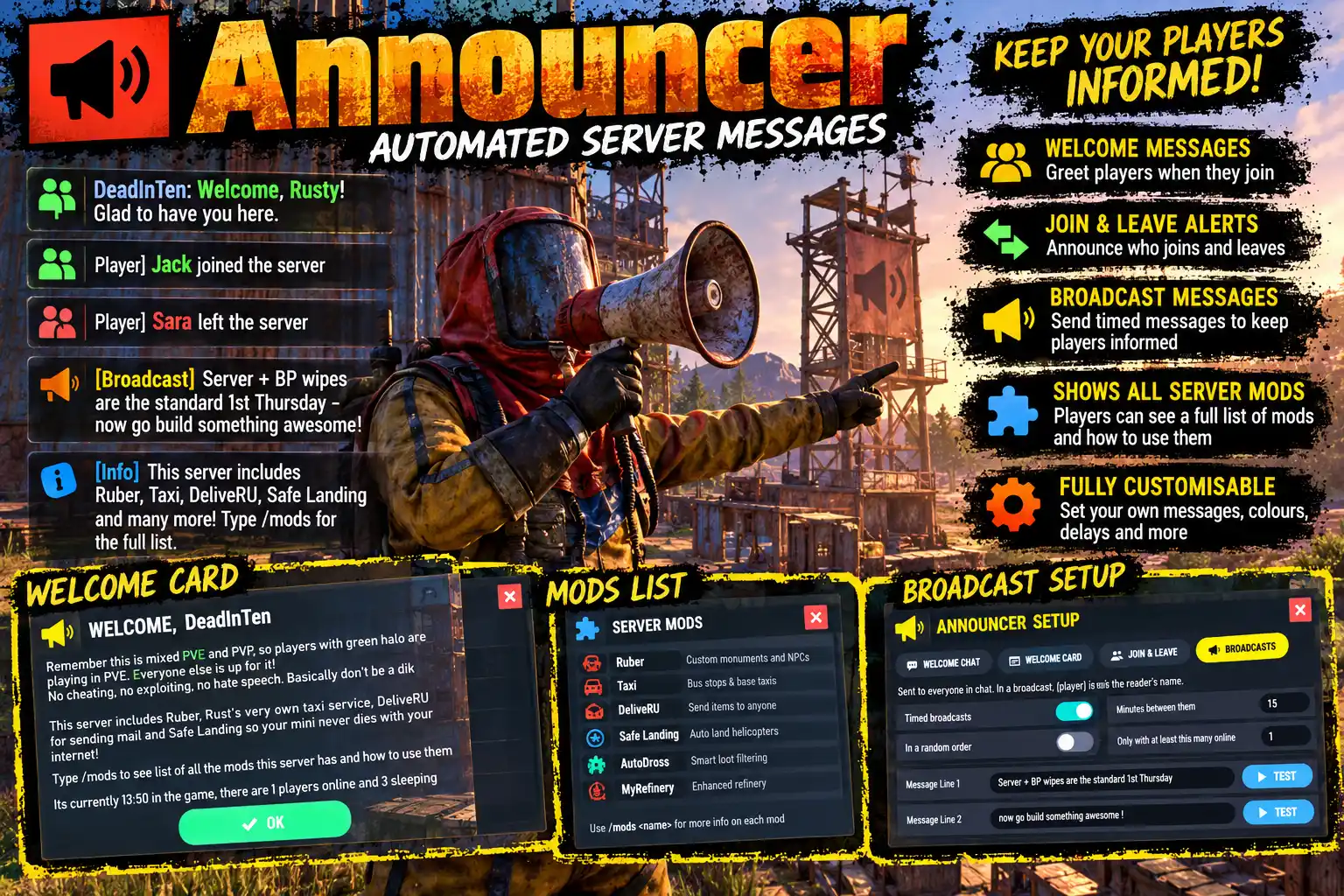
Announcer makes your server feel looked after from the first second. New players are welcomed by name once they have actually loaded in, everyone else is told who has joined and who has left, and timed broadcasts keep your rules and tips in front of people. Every message is written in game, in a panel, with no file editing and no reload. Takes the absolute ballache out of trying to explain how to use your plugins without having to funnel your players off to Discord for directions...
A proper welcome
- Welcomed once they can see it. The welcome is sent after a player has finished loading and is awake, not while the map is still streaming in and chat is scrolling past unread.
- First visit and return visit, told apart. A new player can be given the rules; a regular gets "welcome back, your last visit was 3 days ago".
- A welcome card can open in the middle of the screen with an OK button: on a first visit only, on every visit, or never.
/welcomeshows it again any time.
Joins, leaves and broadcasts
- Who joined and who left, with a message of its own for a brand new player ("say hello").
- No spam from reconnects. A player who drops and is back within a minute is not announced again or welcomed twice.
- Quiet when you want it. Admins can be left out with one switch,
announcer.silenthides a named player, and join and leave messages can stop above a number of players online. - Timed broadcasts. Up to eight messages, one every so many minutes, in turn or at random, only while enough players are online.
- Announcements.
/announce <text>(orannouncer.sayfrom the console or RCON) goes to everyone in chat and, if you like, across the top of the screen for a few seconds.
/mods: show players what your server runs
/mods opens a scrolling card listing the plugins on your server: each one's name, its commands and how to use it. ADD LOADED PLUGINS fills in every plugin that is running with its name, its chat commands and its own description, ready for you to edit. Any entry can hold a full guide, which opens out beneath it when a player clicks it.
Placeholders and rich text
{player}, {online}, {max}, {sleepers}, {server}, {gametime}, {servertime}, {visits}, {lastseen}, {firstseen} and {reason} are filled in for each message, and a PLACEHOLDERS card in the panel lists them all. Rust's rich text works everywhere: colour, bold, italic and size. Player names are cleaned first, so nobody can put colour or a placeholder into everyone's chat through their name.
Set up in game
/announcer opens the panel: WELCOME CHAT, WELCOME CARD, JOIN & LEAVE, BROADCASTS, MODS and SETTINGS. Type a line, click a switch, SAVE, and the new messages are used at once. TEST sends a line to your own chat with the placeholders filled in; PREVIEW shows you the card.
Languages
Your messages are in whatever language you write them in. The panel, the card's OK button and the "3 days" of {lastseen} follow each player's game language: English, Russian, German, French, Spanish, Brazilian Portuguese and Simplified Chinese are built in.
Every download is licensed to you and watermarked with your details.
Features
- Welcomes each player by name once they have loaded in and are awake
- Separate first-visit and return-visit welcome lines
- Optional welcome card with an OK button, first visit or every visit
- Join and leave messages, with its own line for brand new players
- No repeat announcement for a quick reconnect
- Hide admins, or any player with announcer.silent
- Up to eight timed broadcasts, in turn or at random
- /announce to chat and across the top of the screen
- /mods card listing your plugins, filled in from the running server
- Decide which plugins to tell players about with a simple toggle switch
- Placeholders and full rich text in every message
- Every message set up in game, saved without a reload
- Seven languages built in
Install
- Download Announcer.cs from My Plugins.
- Drop it into
oxide/pluginsorcarbon/plugins. - Grant the setup permission to your admins:
o.grant group admin announcer.adminOn Carbon use c.grant instead of o.grant. Everyone is welcomed with no permission needed.
The file name must stay Announcer.cs, because Oxide matches it to the class name.
Type /announcer in game to write your messages. The config is written to oxide/config/Announcer.json (or carbon/configs/Announcer.json) and can still be edited by hand.
Config
{
  "Welcome in chat on a player's first visit (one message a line)": [
    "<color=#7ec8ff>Welcome to {server}, {player}!</color> Glad to have you here.",
    "There are {online} players online. Be kind, and have fun."
  ],
  "Welcome in chat on later visits (one message a line)": [
    "<color=#7ec8ff>Welcome back, {player}!</color> Your last visit was {lastseen} ago. {online} players are online."
  ],
  "Welcome card: off, first (first visit only) or every (every visit)": "first",
  "Welcome card closes by itself after this many seconds (0 = only by its OK button)": 0,
  "Welcome card title": "WELCOME, {player}",
  "Welcome card lines": [
    "This server is run for fun. Please be kind to other players.",
    "",
    "No cheating, no exploiting, no hate speech.",
    "Type /welcome to see this again."
  ],
  "Told to everyone else when a new player joins (empty = nothing)": "<color=#8fd18a>{player}</color> joined for the first time. Say hello!",
  "Told to everyone else when a returning player joins (empty = nothing)": "<color=#8fd18a>{player}</color> joined.",
  "Told to everyone else when a player leaves (empty = nothing)": "<color=#d79a8a>{player}</color> left.",
  "Announce admins joining and leaving": true,
  "A player back within this many seconds of leaving is not announced or welcomed again": 60,
  "No join or leave messages while more than this many players are online (0 = always send them)": 0,
  "First visit again after a wipe (forget every player at a new map)": false,
  "Timed broadcasts on": true,
  "Minutes between broadcasts": 15,
  "Broadcasts in a random order (else in turn)": false,
  "Broadcast only while at least this many players are online": 1,
  "Broadcasts (one message a line)": [
    "Type <color=#7ec8ff>/welcome</color> to read the server rules again.",
    "Thanks for playing, {player}. There are {online} players online right now."
  ],
  "/mods on": true,
  "/mods: text at the top of the list (empty = nothing)": "The plugins running on this server, and how to use them.",
  "/mods: the list, in the order shown": [],
  "Put in front of every message (rich text works; empty = nothing)": "",
  "Chat icon: the Steam ID whose picture the messages show (0 = the game's own)": 0,
  "Seconds after a player wakes before they are welcomed": 2.0,
  "Show /announce across the top of the screen as well as in chat": true,
  "Seconds /announce stays on the screen": 8
}
Commands & Permissions
Commands
Chat
/welcome— show the welcome card again/mods— the list of plugins on the server and how to use them/announcer— open the setup panel (admins)/announce <text>— send a message to everyone (admins)
Console (server console, RCON, or a player with announcer.admin)
announcer.say <text>— send an announcementannouncer.status— what is set upannouncer.show— the messages with placeholders filled in
Permissions
announcer.admin— the setup panel,/announceand the console commandsannouncer.silent— this player's joins and leaves are not announced
Everyone is welcomed; no permission is needed for that.
Changelog
| Version | Released | Changes |
|---|---|---|
| v0.4.2 latest |
|