Overview
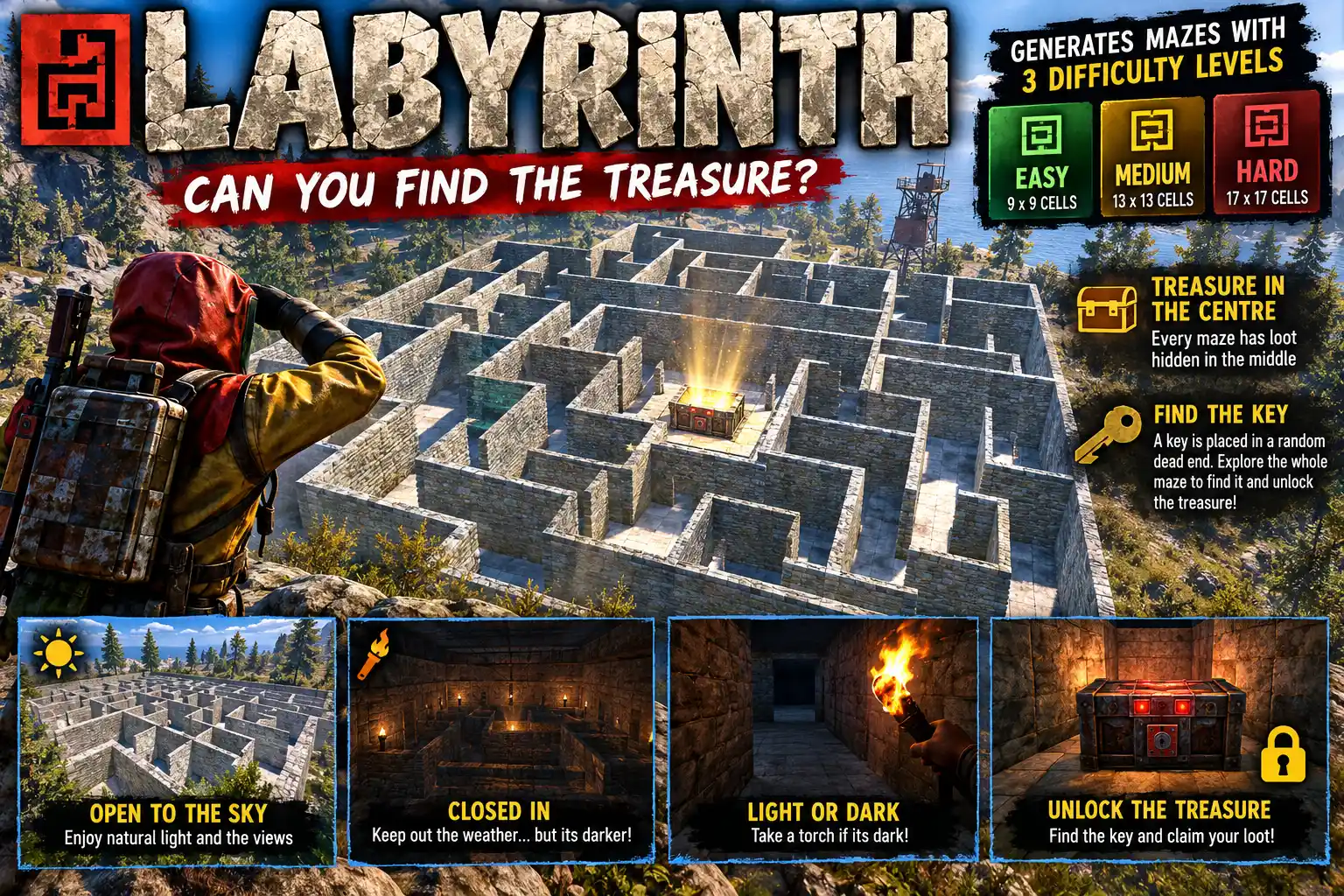
Labyrinth puts stone-walled mazes on open ground, with treasure waiting in the middle. Walk up and the gate opens. Step inside and it shuts behind you. You find the middle of the maze or you never leave.
A real maze, on real ground
Every cell is a stone foundation that follows the land, flat or sloped, so players climb up and down as they go. The walls are built up so the top of the maze is level everywhere, and nothing in it can be damaged. There is no climbing over and no blowing through.
A maze only goes where nothing solid stands inside it. Cliffs and monument pieces rule a spot out before anything is built. Small rocks are buried under a raised floor, and trees, ore nodes and barrels are cleared away.
Getting out
The way in is a garage door. Once you are in, it stays shut until you reach the centre. Then it opens to let you out, and the timer on screen tells you how long you took. A player who slips out some other way is put back inside the gate.
Lay a roof over the whole maze so the sun can't give away a clear route. Switch on Dark under the roof and it is night inside for anyone on a run, so they will want a torch or you can be kind to them and provide a torch on every other wall. Eerie but enough to see.
Treasure and leaderboards
At the centre stand up to 12 large boxes, stacked up to three high, each filled from a loot list you set per tier in the /maze panel. The odd item, food by default, lies in dead ends along the way. An emptied box breaks up like the game's own crates.
Each tier keeps a leaderboard of the fastest times. It is shown in the tier's colour when a player reaches the centre, and anyone can call it up with /maze top.
Mazes that look after themselves
Once the centre has been found and everyone is out, the maze falls down like a decaying base. With automatic placing on, each tier is kept at a set number of mazes on the map, at random spots well away from monuments, tool cupboards, roads, rails, rivers and online players. A maze nobody has entered for six hours (by default) crumbles and goes up again somewhere new.
Every maze is marked on the map in its tier's colour (green easy, amber medium, red hard) and announced in chat with its grid square. Mazes survive a reload or restart and are rebuilt exactly as they were. A new wipe clears them.
Make it yours
- Three tiers, each with its own size, number of loops, loot, dead-end items and number kept on the map
- Wall grade: wood, stone, metal or armoured
- Building skins you own (Adobe, Brick, Brutalist, Jungle and others) used where they suit the biome
- A sign inside the gate with your own text, in seven lettering styles and a choice of colours
Everything is set from the /maze panel (TIERS, SETTINGS and AUTO pages) and saved straight to the config.
Languages
English, Russian, German, French, Spanish, Brazilian Portuguese and Simplified Chinese are built in. Each player sees their own game language.
Every download is licensed to you and watermarked with your details.
Features
- Stone mazes on flat or sloped open ground
- Gate shuts behind you and opens only once you reach the centre
- On-screen timer and a leaderboard per tier
- Optional roof, and night under it so a torch is needed
- Up to 12 loot boxes at the centre, loot set per tier in game
- Odd items left in dead ends along the way
- Walls cannot be damaged, climbed over or blown through
- Maze falls down once solved and empty
- Automatic placing keeps each tier on the map at safe random spots
- Unvisited mazes move to a new spot after a set time
- Map markers in the tier's colour and a chat announcement
- Owned building skins chosen to suit the biome
- Gate sign in seven lettering styles and a choice of colours
- Survives reloads and restarts
- In-game /maze panel for every setting
- Seven languages built in
Install
- Download Labyrinth.cs from My Plugins.
- Drop it into
oxide/pluginsorcarbon/plugins. - Grant the admin permission to whoever will set it up:
o.grant user <name> labyrinth.adminOn Carbon use c.grant instead of o.grant. Players need no permission to run a maze.
- Type
/mazein game to set up the tiers and loot. Then either stand where you want one and type/maze spawn easy, or switch on automatic placing on the AUTO page.
The file name must stay Labyrinth.cs, because Oxide matches it to the class name.
The config is written to oxide/config/Labyrinth.json (or carbon/configs/Labyrinth.json) on first load. Everything in it can be changed from the /maze panel.
Config
{
  "Wall grade (1 wood, 2 stone, 3 metal, 4 armoured)": 2,
  "Garage door at the gate, shut until the centre is found": true,
  "The gate shuts again this long after being opened (s)": 6.0,
  "Roof over the maze (floors on top of the walls)": false,
  "Dark under the roof: night for players inside, a torch needed": false,
  "Timer on screen while in the maze": true,
  "Mazes marked on the map, coloured by tier": true,
  "Announce new mazes in chat, with their grid square": true,
  "Sign on the wall facing you inside the gate (empty = no sign; | starts a new line)": "",
  "Gate sign font (rye, sancreek, bebas, blackops, pirata, courier, block)": "rye",
  "Falls down once the centre is found and everyone is out": true,
  "Falls down this long after the gate shuts behind the last player (s)": 5.0,
  "A maze nobody has been inside for this long falls and goes up at a new random spot (hours, 0 = never)": 6.0,
  "Automatic placing: put mazes up at random spots by themselves": false,
  "Automatic placing: metres from monuments": 150.0,
  "Automatic placing: metres from tool cupboards": 150.0,
  "Automatic placing: metres from other mazes": 300.0,
  "Automatic placing: metres from online players": 50.0
}
Commands & Permissions
Commands
Chat (labyrinth.admin)
/mazeopens the settings panel (TIERS, SETTINGS, AUTO)/maze spawn <easy|medium|hard> [seed]puts a maze in front of you, gate facing you/maze removetakes down the nearest maze/maze listlists every maze standing/maze top [easy|medium|hard]shows a tier's leaderboard (any player)
Console (admin or RCON)
labyrinth.spawn <tier> <x> <z> [yaw] [seed]puts a maze up at a spotlabyrinth.remove <id|all>takes one or all downlabyrinth.listlists every mazelabyrinth.show <id>draws the layout in textlabyrinth.site <tier> <x> <z> [yaw]says whether a maze would fit there, and why notlabyrinth.uiopens the settings panel (bindable)labyrinth.boxes <id>lists what is in each loot boxlabyrinth.collapse <id>makes a maze fall down nowlabyrinth.auto [now]shows how automatic placing stands, or looks for a spot now
Permissions
labyrinth.adminlets a player use/mazeand its settings, spawn and remove mazes
Players need no permission to enter a maze or see the leaderboard.
Changelog
| Version | Released | Changes |
|---|---|---|
| v0.6.8 latest |
|