Overview
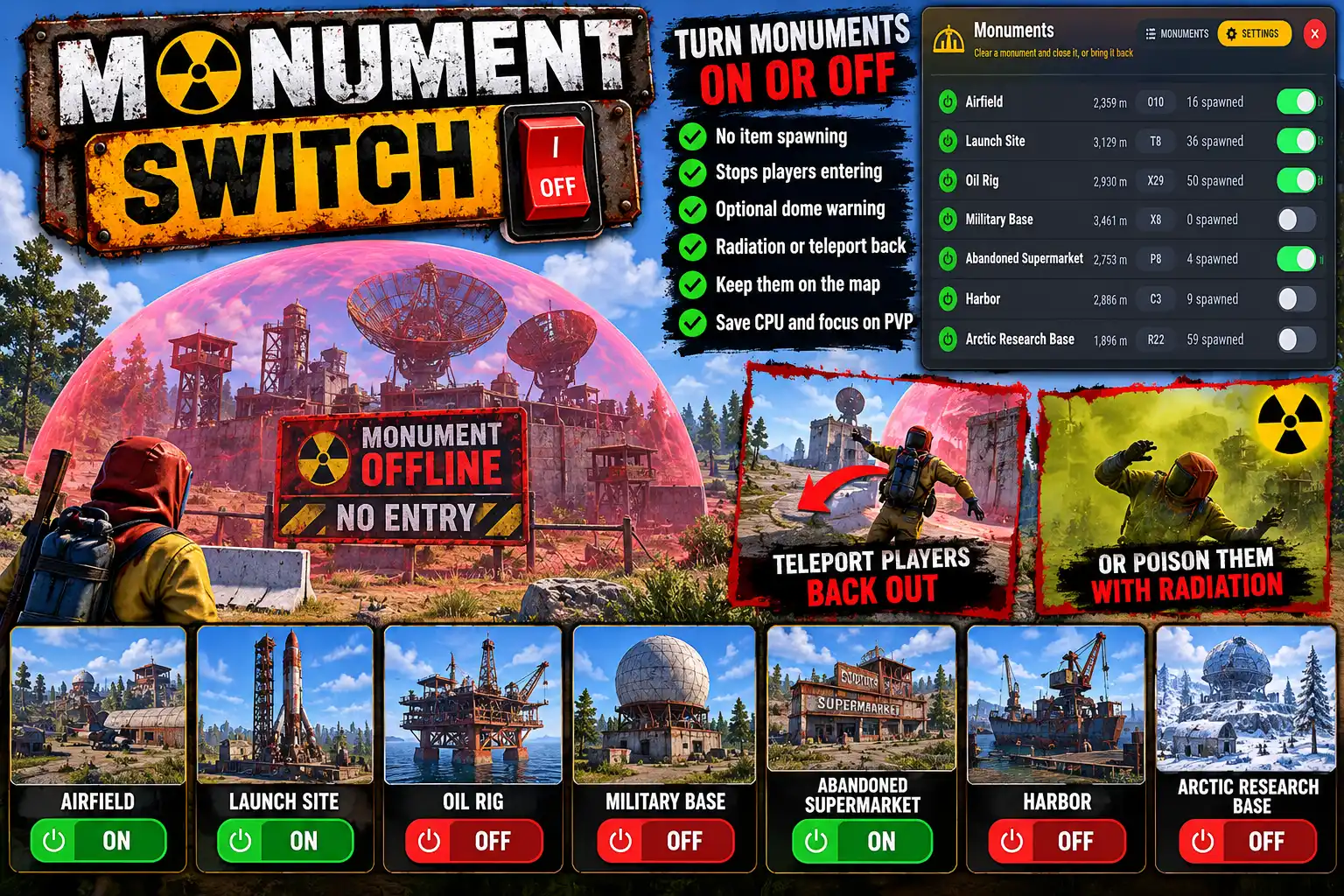
MonumentSwitch lets you switch a monument off for the rest of the map, and back on whenever you like. It is built for cutting the server's entity count. A quiet monument nobody visits still keeps its crates, barrels, pickups and NPCs alive all wipe.
While its baked into the map and you cannot take the monument itself off you can prevent everything that spawns there and stop people entering the area.
Ideal if you're setting up an area for an event and need people out of the way. Or turning off places nobody visits to concentrate server resources on PVP areas.
Off means empty
Switch a monument off and its loot crates, barrels, pickups and NPCs are cleared. Nothing there respawns until you switch it back on, and then it refills at once.
The monument's buildings stay, because every client builds those for itself from the map. Its fixed parts stay too (doors, card readers, recyclers, vending machines), because the game never respawns them, so removing them couldn't be undone. Roadside loot, ore and animals belong to the whole map and are left alone.
Players know before they travel
A monument that is off has a dome over it and a circle over it on the in-game map. Both go when it is switched back on.
Players are kept out. On walking in they are told it is closed, and a few seconds later, if they are still inside, either:
- Move (the default): they are put on dry land just outside the dome, or
- Radiation: they take radiation damage every second, which no clothing or pills stop, until they leave or die.
Sleepers are left alone until they wake. Anyone with the bypass permission can walk in freely.
One panel for the lot
/monuments lists every monument that spawns something, with how much it has spawned right now and an on/off switch for each. Sort by size, name, distance or what is spawned now, and see totals at the top. The SETTINGS tab changes everything in game: how players are kept out, the grace period, radiation strength, dome colour and strength, the map circle. Each change applies at once.
The switches belong to the map they were set on. A new map, or loading a different save, starts with every monument on.
Languages
English, Russian, German, French, Spanish, Brazilian Portuguese and Simplified Chinese are built in. Each player sees their own game language.
Every download is licensed to you and watermarked with your details.
Features
- Switch any monument off and back on
- Crates, barrels, pickups and NPCs cleared and kept from respawning
- Refilled at once when switched back on
- Dome over a closed monument, colour and strength set in game
- Circle on the in-game map over closed monuments
- Players moved out, or irradiated, after a grace period
- Bypass permission for admins and staff
- /monuments panel: every monument, its spawn count and a switch
- Sort by size, name, distance or spawned now
- SETTINGS tab applies every change at once
- Console commands for RCON and scripts
- Switches reset with a new map or save
- Seven languages built in
Install
- Download MonumentSwitch.cs from My Plugins.
- Drop it into
oxide/pluginsorcarbon/plugins. - Grant the admin permission to whoever will run it:
o.grant user <name> monumentswitch.adminOn Carbon use c.grant instead of o.grant. Grant monumentswitch.bypass to anyone who should be able to walk into a closed monument.
- Type
/monumentsin game and switch off the monuments you don't need.
The file name must stay MonumentSwitch.cs, because Oxide matches it to the class name.
The config is written to oxide/config/MonumentSwitch.json (or carbon/configs/MonumentSwitch.json) on first load. Everything in it can be changed from the SETTINGS tab.
Config
{
  "Turn players away from monuments that are off": true,
  "How players are kept out: Move (put just outside the edge) or Radiation (hurt until they leave or die)": "Move",
  "Seconds a player may stay inside after being told (0 = at once)": 5.0,
  "Radiation damage per second (no clothing or pills stop it)": 5.0,
  "Dome over monuments that are off": true,
  "Dome colour (red, green, purple, blue, grey)": "red",
  "Dome strength (1-5 layers; more is easier to see)": 5,
  "Circle on the map over monuments that are off": true,
  "Metres outside the dome to put a player": 5.0,
  "Seconds between checks that nothing has respawned at a monument that is off": 30.0
}
Commands & Permissions
Commands
Chat (monumentswitch.admin)
/monumentsopens the panel: every monument, its spawn count and a switch, plus SETTINGS
Console (server console, RCON, or a player with the admin permission)
monumentswitch.listlists every monument, its id and statemonumentswitch.off <name|id>switches one offmonumentswitch.on <name|id>switches one back onmonumentswitch.set [setting value]shows the settings, or changes one (turnaway on|off,keepout move|radiation,grace,radiation,margin,dome on|off,colour red|green|purple|blue|grey,layers 1-5,circle on|off,sweep)
A name matches any monument whose name contains it. When it matches more than one, the matches are listed and nothing changes, so use the id.
Permissions
monumentswitch.adminlets a player use/monumentsand the console commandsmonumentswitch.bypasslets a player walk into monuments that are off
Changelog
| Version | Released | Changes |
|---|---|---|
| v0.4.2 latest | Initial release. |