Overview
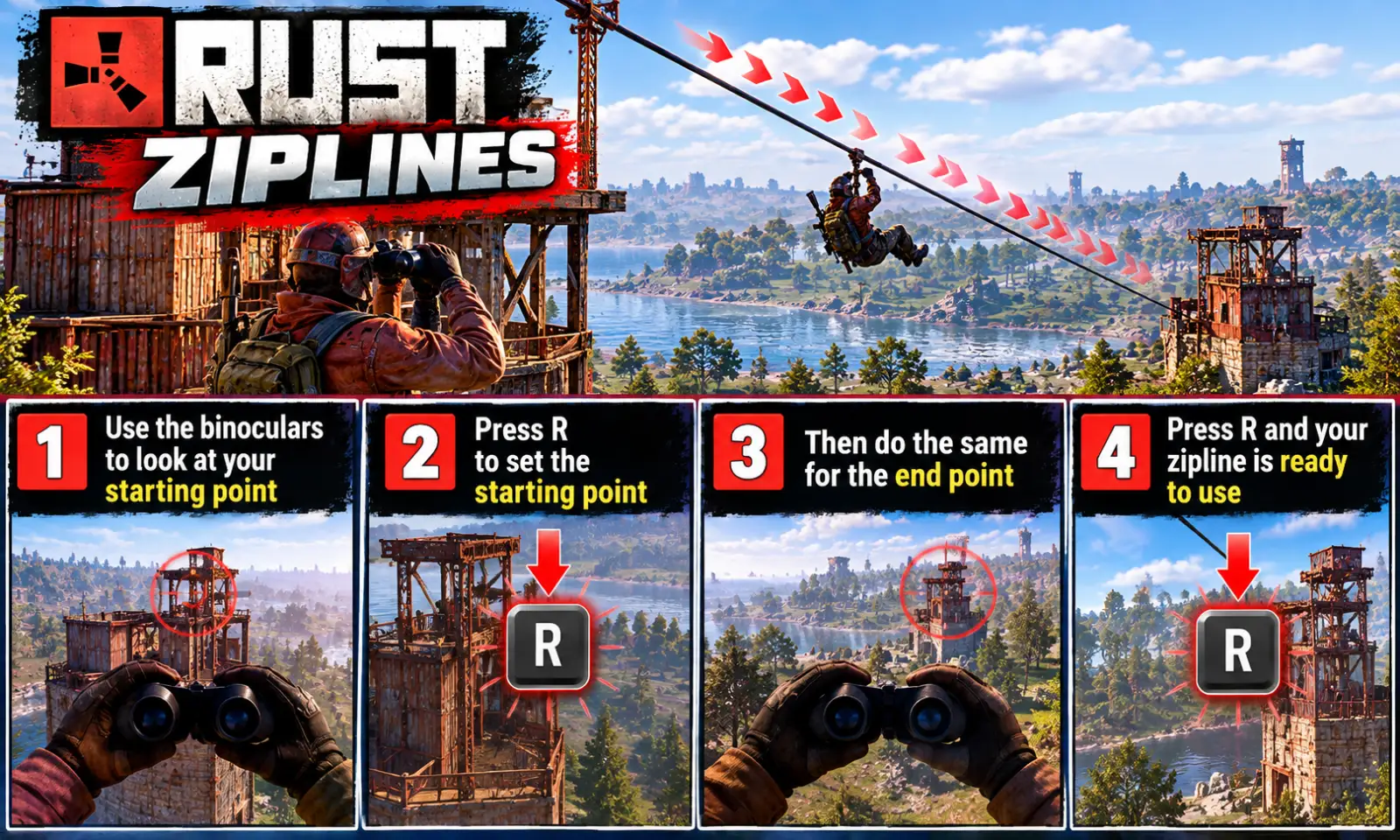
Ziplines lets players string a zipline between any two points they choose: from a treehouse to the next tree, off a cliff, or from one base to another.
It is the game's own zipline, so riding one feels exactly like the ones at monuments.
How it works
- Open the panel with
/ziplineand make a Zipline Kit (200 wood and 1 rope by default). - Hold the kit, look at where the line should start — a tree trunk, a wall, a post or a rock face, at about head height — and press R.
- Look at the far end (a wall works too) and press R again to link the two.
- To ride: stand under the start, look along the line and press E.
Before a line goes up the plugin checks its length and slope, that nothing is in the way, and that there is somewhere to land at the far end. If it refuses, it says why — for example "That climbs at 18 degrees. A zipline can climb at most 15."
Each line runs one way; put up a second for the trip back. Both ends are tied to what they were aimed at, and if that is destroyed the line comes down with it (and the kit goes back to its owner). Put the kit away to forget a marked start.
Managing lines
The panel lists each player's lines with their length, grid squares and slope (climbs 6°, drops 12° or level), so two lines between the same squares — one there, one back — are easy to tell apart. Take down removes one and returns the kit.
Languages
English, Russian, German, French, Spanish, Brazilian Portuguese and Simplified Chinese are built in — no lang files to install. Each player sees the language their own client is set to.
Every download is licensed to you and watermarked with your details.
Features
- Zipline between any two points: trees, walls, posts and rock faces
- The game's own zipline, ridden with E
- Built from a kit that costs wood and rope, with a rope charge per length of line
- Checks length, slope, obstructions and the landing before building
- Panel lists every line with its length, grid squares and slope
- Lines come down when what they are tied to is destroyed
- Per-player limit, length, climb and drop limits, all in the config
- Permissions to lift the angle and length limits for chosen players
- Seven languages built in
Install
- Download Ziplines.cs from My Plugins.
- Drop it into
oxide/pluginsorcarbon/plugins. - Grant the permission:
o.grant group default ziplines.useOn Carbon use c.grant instead of o.grant.
The file name must stay Ziplines.cs — Oxide matches it to the class name.
The config is written to oxide/config/Ziplines.json (or carbon/configs/Ziplines.json) on first load. Edit it, then reload the plugin (o.reload Ziplines or c.reload Ziplines).
Config
{
  "Web address shown in the About dialog (empty hides the footer)": "https://deadinten.uk",
  "Item the kit is made from (a skinned copy of it; binoculars help aim at the far end)": "tool.binoculars",
  "Skin id that marks the item as a Zipline Kit": 3585192006,
  "Name the kit shows in the inventory": "Zipline Kit",
  "What one kit costs to make (item short name: amount)": {
    "wood": 200,
    "rope": 1
  },
  "Rope used when a line goes up: one per this many metres of line (0 = none)": 20.0,
  "Give the kit back when a line is taken down": true,
  "Most lines one player may have up at once (ziplines.unlimited ignores it)": 4,
  "Shortest line (metres, measured flat)": 8.0,
  "Longest line (metres, the game's own ziplines stop at 185)": 150.0,
  "Steepest climb (degrees; the rider is pulled along at the same speed uphill)": 15.0,
  "Steepest drop (degrees)": 45.0,
  "Refuse a line that starts or ends where the player is building blocked": true,
  "Seconds a marked start is kept while you pick the far end": 120.0
}
Commands & Permissions
Commands
Chat
/zipline— open the panel/zipline kit— make a Zipline Kit/zipline remove— take down the nearest of your lines (stand at either end); the kit comes back
Console (all bindable, e.g. bind z ziplines.open)
ziplines.open/ziplines.close— open or close the panelziplines.kit— make a Zipline Kitziplines.remove [id]— take down the nearest line, or the one with that id
Permissions
ziplines.use— allows building ziplinesziplines.unlimited— any number of linesziplines.free— never needs materialsziplines.anyangle— remove the 15 degree restrictionziplines.admin— admin other people's lines as well as your own
Changelog
| Version | Released | Changes |
|---|---|---|
| v0.3.2 latest | Support now goes to the Support section at DeadInTen.uk. |