Rust Permissions Explained: oxide.grant, c.grant and Groups
How Rust plugin permissions work on Oxide (uMod) and Carbon: users, groups, grant and revoke commands, and a reference of every DeadInTen plugin permission.
Almost every Rust plugin checks a permission before it does anything for a player. Oxide (uMod) and Carbon handle permissions the same way, with slightly different command names.
Users, groups and permissions
- A permission is a name a plugin registers, such as
sonar.use. It always starts with the plugin's name. - A group is a set of permissions. Two exist out of the box:
default, which every player is in, andadmin, for players with admin rights on the server. - A user is one player, by name or Steam ID. A player has a permission if it was granted to them directly or to any group they are in.
Grant to groups wherever you can. It is easier to see who can do what, and a new player picks up everything in default the moment they join.
The commands
Run these in the server console or over RCON. On Oxide:
oxide.grant group default sonar.use
oxide.grant user <name or SteamID> sonar.use
oxide.revoke group default sonar.use
oxide.group add vip
oxide.usergroup add <name or SteamID> vip
oxide.usergroup remove <name or SteamID> vip
o. is short for oxide.: o.grant group default sonar.use is the same command.
On Carbon, the same commands start with c. (c.grant, c.revoke, c.group, c.usergroup), and Carbon also accepts the oxide. and o. forms, so scripts written for Oxide keep working.
To see what someone has on Oxide, oxide.show user <name> lists a player's groups and permissions, and oxide.show perm sonar.use lists everyone who has one.
Wildcards
Oxide accepts a wildcard at the end: oxide.grant group admin ziplines.* grants every ziplines. permission at once. It is handy for admins, but be careful with default: a wildcard also grants permissions a plugin adds in a later version.
A VIP group
oxide.group add vip- Grant the group its extras:
oxide.grant group vip ziplines.unlimited - Add each VIP:
oxide.usergroup add <steamid> vip
VIPs keep everything in default as well, since every player stays in default.
Doing it in game
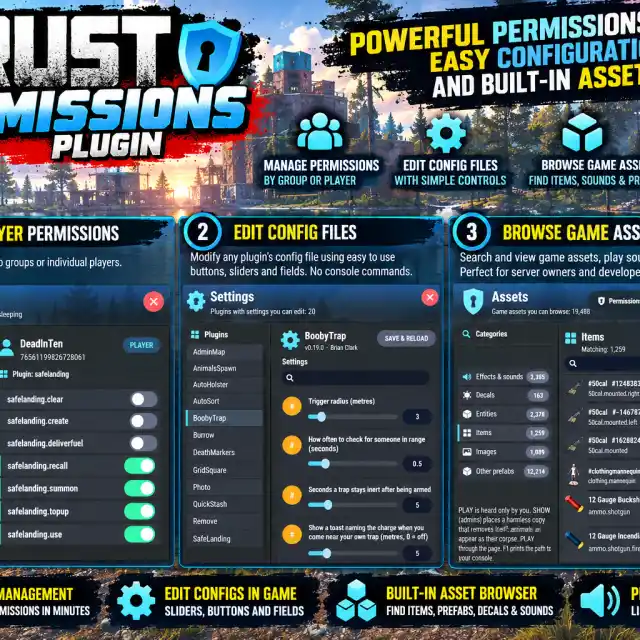
Typing permission names is slow and easy to get wrong. Perms opens a panel of every loaded plugin's permissions, with a switch for each group or player, and a Settings tab that edits a plugin's config in game.
Every DeadInTen plugin permission
Each plugin's page has the same list with its commands, under Commands & Permissions.
AnimalSpawn
animalspawn.use— spawn animals (server admins have it anyway)
AutoHolster
autoholster.use— allows using the plugin
AutoSort
autosort.use— allows using the plugin
BoobyTrap
boobytrap.use— arm containers
Burrow
burrow.use— dig burrowsburrow.hatch— dig hatch shaftsburrow.nodecay— no upkeep
CheatAlarm
cheatalarm.admin— alerts, commands and the panelcheatalarm.exempt— never watched
DeathMarkers
deathmarkers.use— keep death markers
DeliveRU
deliveru.use— send and receive deliveries, and own up to the configured number of mailboxesdeliveru.admin— the ADMIN tab: return or finish any delivery and change the fee; sends for free unless Admins pay the fee is on
GridSquare
gridsquare.use— see the square
MemoryGauge
memorygauge.admin— the gauge, the panel, alerts and every command
Perms
perms.use— permissions tabperms.config— Settings and Assets tabs (showing entities and items is for admins only)
Grant to named players only: oxide.grant user <name> perms.use
Photo
photo.use— put photos on framesphoto.url— load photos from a web address
Probe
probe.admin— the panel, the corner gauge, alerts and every commandprobe.use— a player's own connection card (/probe) and fps check
Server console and RCON can always run the console commands.
QuickStash
quickstash.use— allows using the plugin
Remove
remove.use— what you own or are authorised onremove.all— anything
Ruber
ruber.use— ride taxis and ferries, and use a stop's panelruber.build— put up stops and jetties and link them into lines (can ride too)ruber.admin— edit or remove any stop, public stops, taxi commands and SETTINGS (server admins have it anyway)
SafeLanding
safelanding.use— aircraft land safelysafelanding.recall,.summon,.create,.clear,.deliverfuel,.topup— VIP features
ShootingStars
shootingstars.use— told about showers and landings; events only run while a holder is onlineshootingstars.admin— the settings panel and test commands (server admins need it granted too)
Sonar
sonar.use— allows using the plugin
StackBoxes
stackboxes.use— allows using the plugin
Targetting
targetting.use— turrets follow the player's choices
TCUpgrade
tcupgrade.use— allows using the plugin
Teleport
teleport.use— allows using the plugin
TradingPost
tradingpost.use— build and use trading poststradingpost.lock— lock IN and OUT boxes from the paneltradingpost.admin— server settings tab (server admins have it anyway)
Translate
translate.use— chat is translated for you, and the settings paneltranslate.admin— the server settings in the panel, and the admin commands
The swearing filter's server-wide settings apply to every player, with or without a permission.
Treehouse
treehouse.use— allows using the plugin
Weather
weather.use— the barweather.setup— the settings panel
Ziplines
ziplines.use— allows building ziplinesziplines.unlimited— any number of linesziplines.free— never needs materialsziplines.anyangle— remove the 15 degree restrictionziplines.admin— admin other people's lines as well as your own